A MAG IPTV box doesn't use a player app or a username. It identifies itself by its MAC address, so you send us that address, we link it to your line and reply with a portal URL, and you type that URL into the box's settings. After a restart the channels, the guide and the movie library load like on a cable box, with a simple remote and no app to update.
In numbers
The MAG route in numbers
00:1A:79
how every MAG MAC address begins
1
portal URL to type in
60,000+
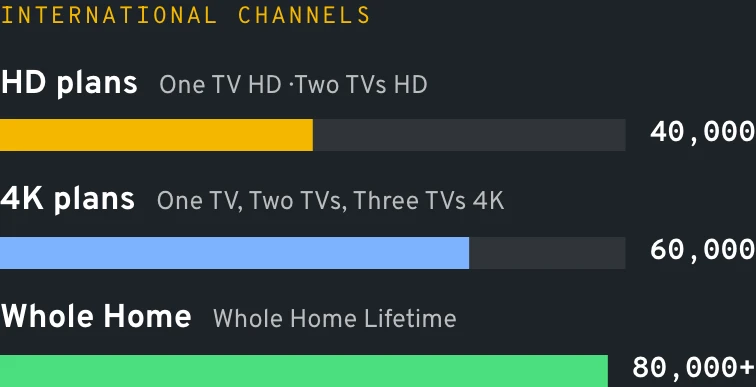
international channels on One TV 4K
7/7
WhatsApp help while you set it up
Mile1.0
Why people keep them
Why a MAG box still earns its spot under the TV
Plenty of US homes have a MAG box from a previous service sitting in a drawer, and the people who like them really like them. The remote has real channel up and down buttons, the box boots straight into TV, and there is no store, no ads and no app that changes its menus overnight.
That makes a MAG IPTV box a strong pick for grandparents, for a guest room, or for anyone who wants television to behave like the cable box they had for twenty years. The trade-off: you can't install other apps, so streaming services and games stay on another device.
It also travels well. Snowbirds who split the year between Michigan and Florida unplug the MAG IPTV box in October, pack it with the coffee maker, and plug it into the condo router a few days later. The portal follows the MAC, not the address, so nothing needs re-entering.
Mile1.7
Set up your MAG IPTV box in seven steps
Menu names below match recent Infomir firmware; older or newer versions may word them a little differently.
Plug in and power on
HDMI into the TV, power in, and ideally a network cable straight from the router. Give the start screen time to settle.
Find the MAC address
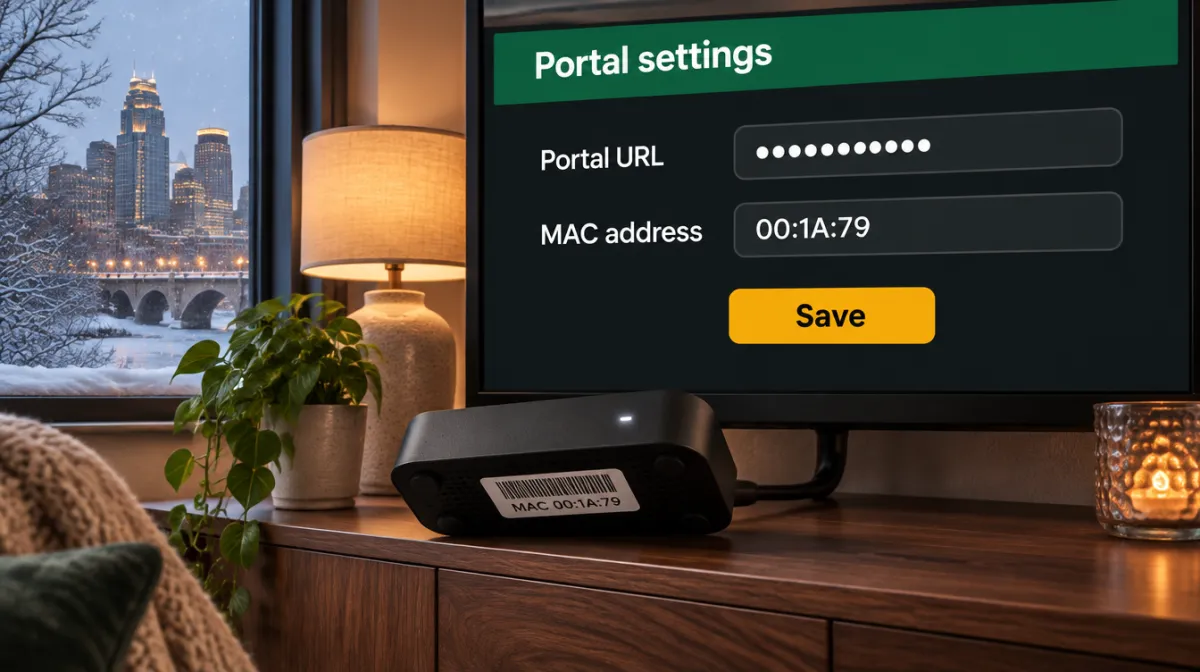
Flip the box over: the sticker shows a MAC that starts with 00:1A:79. The same number appears in the settings under device or system info.
Send it to us
Message the MAC on WhatsApp with the plan you bought or want. A clear photo of the sticker avoids typos between a zero and the letter O.
Open the portal menu
Press SETUP (on some remotes SET) and go to System settings, then Servers, then Portals.
Enter the portal URL
Give Portal 1 any name, then type the URL we sent exactly, including http:// and the final slash. Save with OK.
Restart the portal
Leave the menu and pick the portal restart option (a full reboot also works). With tens of thousands of channels, give the first load a minute or two.
Set your time zone
In the same settings menu, choose your zone (Eastern, Central, Mountain, Pacific, Alaska or Hawaii) so the guide shows local times.
Done. Screen looks different from these steps? Snap it with your phone and send the picture over WhatsApp; we'll point to the right button.
Diagram
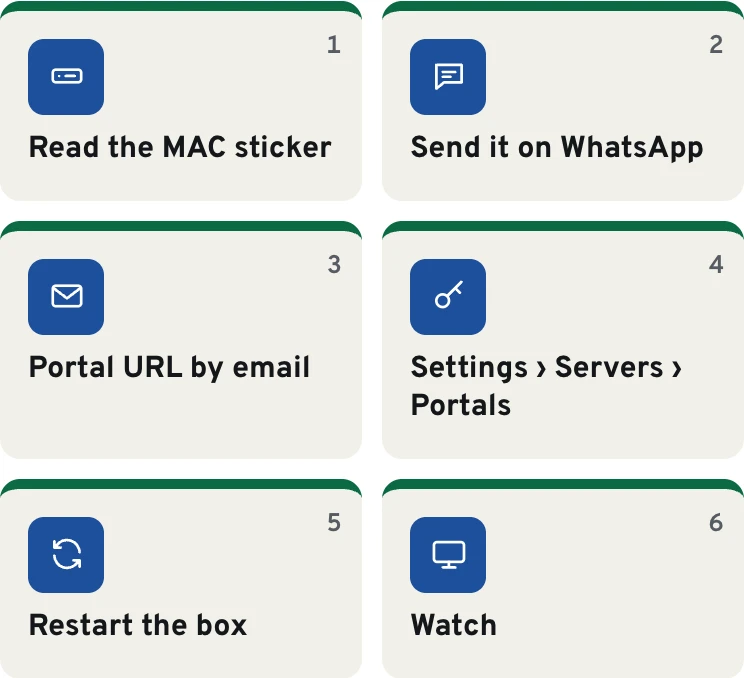
MAG box setup, start to finish
Mile2.4
MAG models we see most in US homes
We don't sell any of them, but these are the boxes our customers plug in. Check the spec sheet of your exact unit for Wi-Fi and 4K support.
MAG 322 and 324
The older Full HD generation. They still handle the portal without fuss and pair well with One TV HD in a guest room; 4K feeds need newer hardware.
MAG 420, 424 and 425
4K-capable boxes with HEVC decoding, a common upgrade for households moving to the One TV 4K line.
MAG 520, 522 and 524
The current mainstream family: quicker menus, 4K playback and faster loading of a long channel list.
MAG 540 and 544
Top of the range, built for 4K televisions and the full Whole Home Lifetime list.
Models with a w suffix
A w1, w2 or w3 at the end of the name (322w1, 424w3, 520w3) means Wi-Fi is built in. Without it, plan on Ethernet or a supported USB adapter.
Illustration
Where the portal URL goes on a MAG box
Settings › Servers › Portals
MAC address on the sticker: 00:1A:79:••:••:••
Save
Illustration of the MAG settings menu.
Mile3.1
Compare
MAG box, Firestick or Android box?
All three run our lines. The difference is how you enter the login and how the remote feels.
MAG box
Firestick / Fire TV
Android TV box
How the line is added
Portal URL linked to the MAC
Xtream codes or M3U in a player app
Xtream codes or M3U in a player app
Player app needed
No
Yes
Yes
Remote feel
Number pad, channel up and down
Small voice remote
Varies by box
Other apps
No
Yes
Yes
Moving the line to a new device
New MAC to register with us
Type the login into the new app
Type the login into the new app
Data
What each device takes
Device
Xtream codes
M3U link
Portal + MAC
4K
MAG box
no
no
yes
Newer models
Fire TV Stick
yes
yes
no
4K / 4K Max
Android TV, Google TV
yes
yes
no
4K models
Samsung, LG smart TV
Some apps
yes
no
4K sets
Logins come as Xtream codes and M3U; MAG gets a portal.
Mile3.8
MAG IPTV box messages and what they mean
Symptom
Likely cause
Fix
"STB blocked" or an authentication error
The MAC isn't linked yet, or one character was sent wrong
Send us a fresh photo of the sticker; we check the MAC against your line within the chat
Stuck on "Loading portal"
The address was mistyped, or the box has no network connection
Retype the URL with http:// and the closing slash, and confirm the Ethernet light is on
Guide times off by one to three hours
The box is still set to another time zone
Select your own zone (say, Central for Chicago) in the box's time menu, then reload the portal
A 4K channel stutters or shows no picture
An older Full HD model, or a weak Wi-Fi link
A 3xx unit tops out at Full HD, so open that copy; on a newer box, a network cable usually ends the stutter
The remote does nothing
Tired batteries or something blocking the infrared path
Swap the batteries and clear the line of sight to the front of the box
Diagram
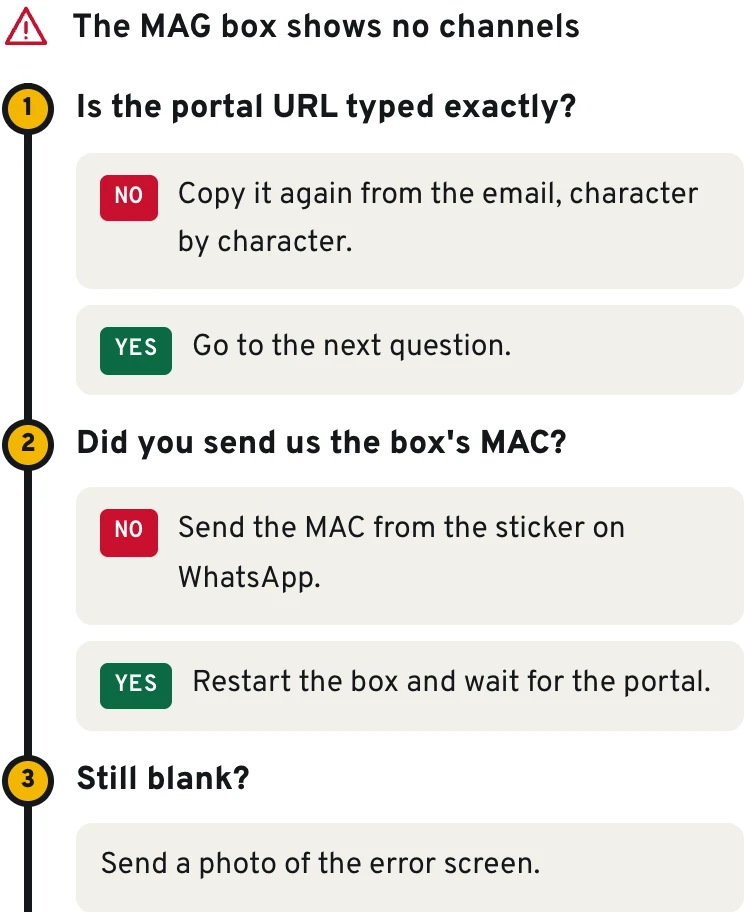
Find the fix in three questions
Mile4.5
Plans
Plans that work on MAG boxes
Every plan runs through the portal, including the guide and parental PIN. Pick a 4K plan or Whole Home if your box is a 4K model; One TV HD suits the older 3xx boxes.
No, we never sell devices. You buy the MAG box from any electronics retailer or reuse one you already own, and we provide the line that runs on it.
Can I reuse a MAG box from another service?
Yes. Replace the old address under Portals with the URL we send, restart the portal, and the box loads our list. Nothing else on it needs changing.
How do I reach the adult section on a MAG box?
It sits in its own folder, locked by the personal PIN that comes with your login. Type the PIN with the remote's number pad when the box asks; you can change or reset it later.
Can my MAG box show 4K?
Yes on 4K models such as the 4xx and 5xx families, together with a 4K plan or Whole Home Lifetime line. A 322 or 324 plays Full HD, which still looks good on most bedroom TVs.
Does the box show the TV guide?
Yes. The guide is part of the portal on every plan and fills in after the first load. On the 4K plans and Whole Home Lifetime you reach catch-up from that same guide; if your firmware words it differently, ask us on WhatsApp.
What happens if I move or switch internet provider?
Nothing on our side. The line is tied to the box's MAC, not to your street or your router, so in a new apartment the box works the moment it is back on a network.
Can one plan cover both a MAG box and a Firestick?
A multi-screen plan can cover both, with the MAG on its portal and the stick on Xtream codes. Tell us on WhatsApp which devices you have and we'll set it up that way.
Some households want the MAG simplicity in the den and a full streaming stick in the living room. The Firestick setup guide and the Android TV and Google TV page cover those devices, and our TV guide and setup hub ties all of them together. Running a small business that supplies boxes to customers? The reseller program lets you register MAC addresses yourself.
For background on the hardware category itself, the set-top box article on Wikipedia explains where these units came from.
Data
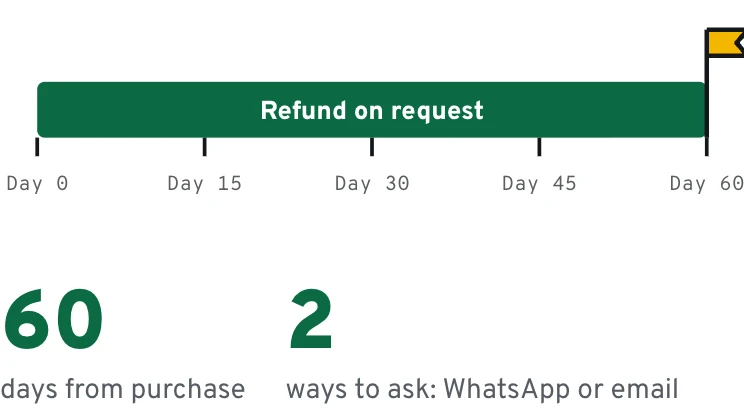
MAG box owners get the same 60 days
Last exit before the plans
Send us your MAC and we'll take it from there
Pick a line on the plans page, then send us the MAC from the sticker under the box on WhatsApp. Pay with a major card or a phone wallet, or move the money by bank transfer and pay 10% less.