IPTV providers run the part of television you never see: the servers that carry tens of thousands of international channels, the login that opens them, the guide data that fills the grid and the people who reply when a picture stalls. The player app on your TV comes from a separate developer, and your bandwidth comes from your internet company. This page draws those lines clearly, shows how we work as a provider for US homes and lists the facts worth comparing before you pay anyone.
Plans
Three plans, one provider, prices in dollars
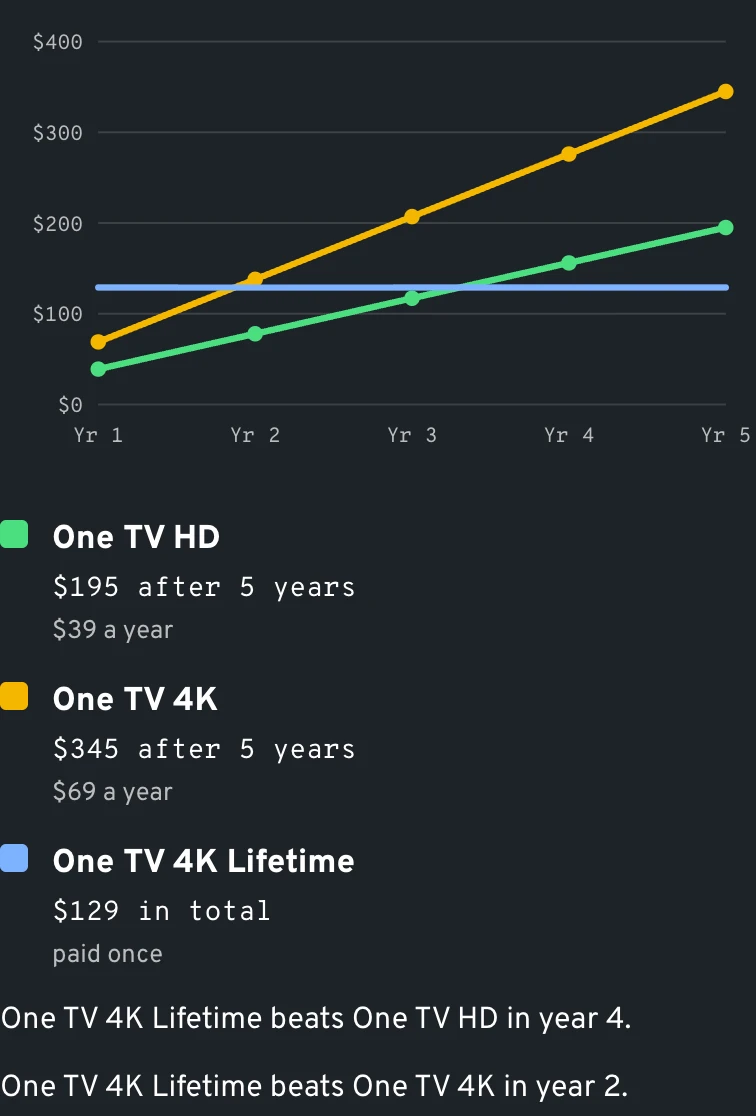
Three price points: $39 a year buys One TV HD, $69 a year buys One TV 4K, and $299 paid one time buys Whole Home Lifetime. The cards spell out channel totals, library size, picture quality and screen count, which keeps the comparison about contents instead of slogans.
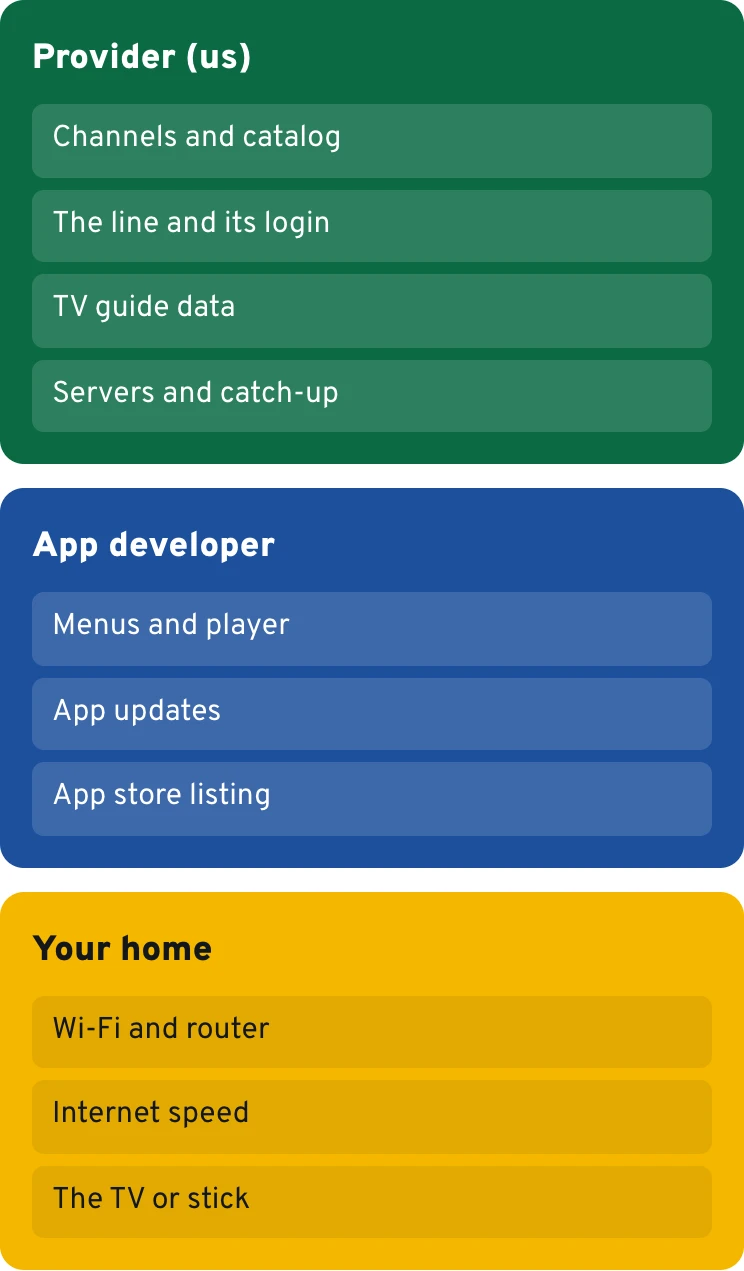
When people talk about IPTV providers, they often lump three businesses together. Your internet company delivers bandwidth to the router and never sees what you watch. The app developer designs the player: the channel list, the search box, the remote shortcuts. The provider sits between the two and runs the servers, the catalog and the account that turns an empty app into a television service. The technology itself is described well in the Wikipedia article on Internet Protocol television.
Mixing those roles up causes most first-week confusion with IPTV providers. A frozen picture on a weak bedroom Wi-Fi signal is a home network issue. A menu that moved after an app update belongs to the developer. A missing channel, a guide showing the wrong show or a login that refuses to connect is ours, and we handle it on WhatsApp seven days a week.
Diagram
Who fixes what
Mile1.7
Behind the login
Six jobs a provider handles around the clock
Servers and load balancing
Our streams run on dedicated servers in Europe. Load balancing spreads viewers over several machines, so a Sunday of NFL games does not push every household onto the same box.
The line itself
A line is a username, password and server address (Xtream codes) or one long M3U link. Every player app asks for one of the two, and that is what IPTV providers actually sell.
The guide feed
EPG data ties each channel to its schedule: what is on now, what comes next. We send it with the line; the app only paints the grid on screen.
Library and catch-up
Between 90,000 and 250,000+ movies and series sit on the same account. The 4K plans add 3 days of catch-up and Whole Home keeps 7 days, handy for a late West Coast game.
Adult section and PIN
An adult catalog rides along on every plan, sized at 3,000 for the HD plans, 6,000 for the 4K plans and 9,000 for Whole Home, and a personal PIN in your welcome email keeps it closed. Pick a code of your own or reset it at will.
People who answer
Setup questions, a lost password, a MAG portal or a new TV: one WhatsApp thread covers it, and the same thread carries a reminder before your plan ends.
Illustration
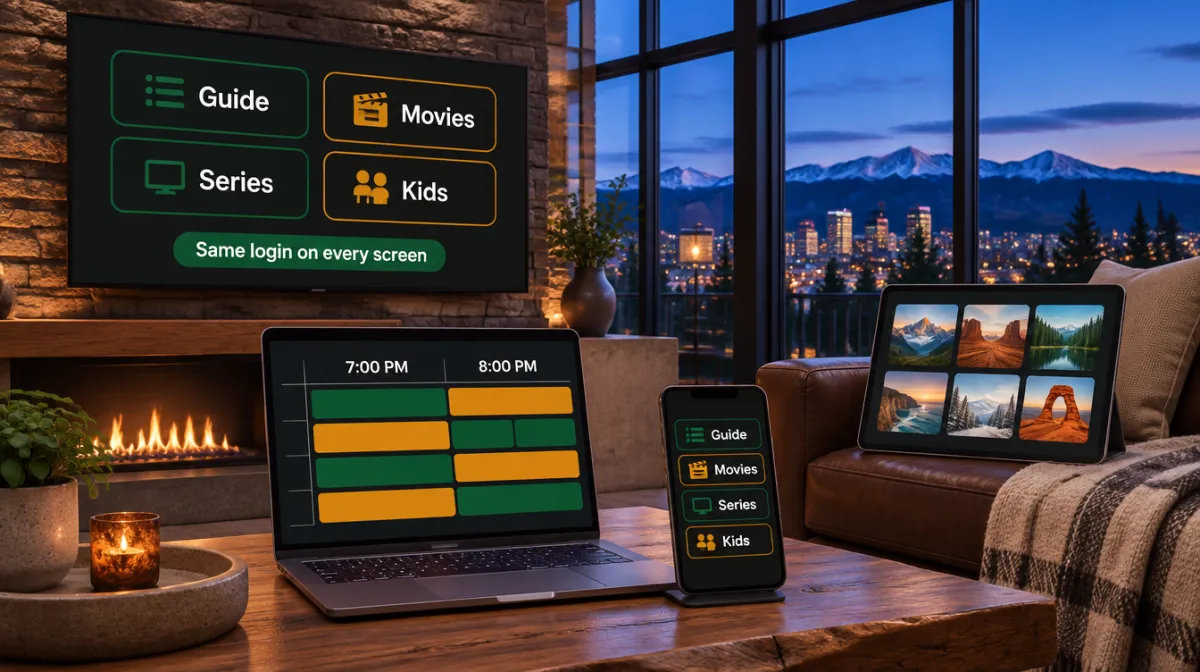
One job a provider runs daily: the guide
TV guide
7:00 pm8:00 pm9:00 pm10:00 pm
Sports 1
Overtime TalkMatchday Build-UpNight Game
Sports 2 4K
Fight Night PreviewRingside ClassicsLate Rounds
Movies HD
Harbor LightsThe Long Drive
News Int.
Morning DeskWorld HourMarket WrapNight Desk
Kids
Paper RocketsMoon GardenStory Bus
Illustration. Genre channels and program names are made up.
Mile2.4
Provider, app developer or internet company: who fixes what
Keep this table handy when something misbehaves: IPTV providers, app makers and internet companies each own a different slice. Asking the right company first saves an evening of back-and-forth.
IPTV provider (us)
Player app developer
Your internet company
Channel list and movie library
We run it
Shows what the line sends
No role
TV guide data
Sent with the line
Draws the grid and applies your time offset
No role
Login, renewals, reminders
Ours
No role
No role
Menus, skins, remote shortcuts
Not ours
Theirs, and they shift with app updates
No role
Speed into your home
We choose the server routes
No role
Your plan with them, plus your router
App fees
We never sell or charge for an app
Some apps ask a small fee of their own
No role
Refund on the IPTV plan
60 days, on request
Their own policy, if any
Their own policy
Mile3.1
How we run it
How we work as a provider for American homes
Every order follows one route. Pick a line from our published plan list, settle it by major card, Apple Pay or Google Pay, or knock 10% off by bank transfer, and the account details land in your inbox soon after, usually inside thirty minutes. Nothing ships, no installer books a four-hour window, and there is no equipment to rent or return.
The line works in whichever player app you prefer, on Firestick, Google TV, Samsung or LG sets, Apple TV, phones and computers. A MAG box connects through a portal URL: send its MAC address on WhatsApp and we reply with the portal. Every plan carries a VPN link, the guide feed and parental control.
Our top tier, Whole Home Lifetime, gets a server reserved for it, room for 4 simultaneous screens and a 7-day replay window, plus entry to the private Premium Telegram group that no other plan includes.
Mile3.8
From remote to picture
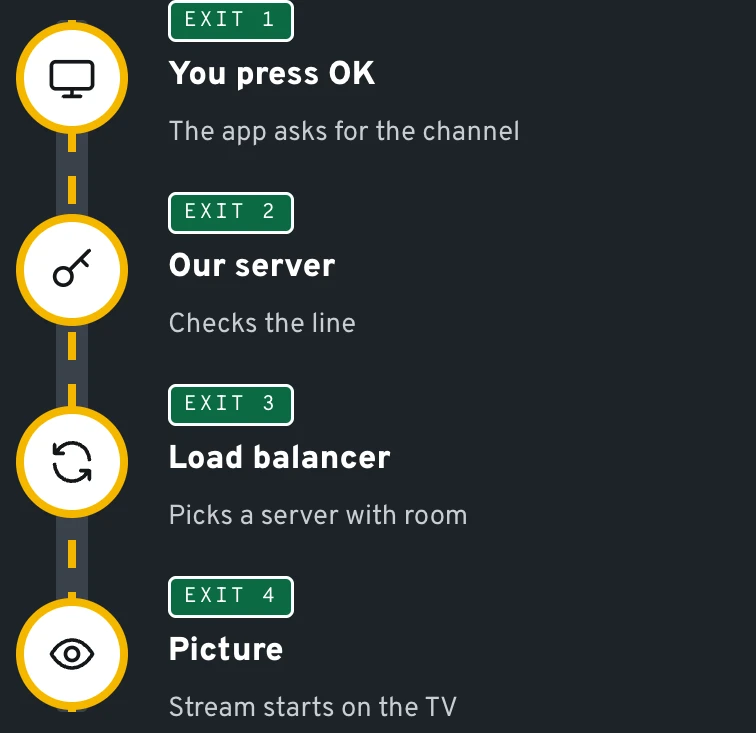
What happens in the second after you press OK
The app calls our server
Your player sends the line details and the channel number to the address in your login. Nothing passes through the app developer on the way.
The balancer picks a machine
Our load balancer hands the request to the least busy server. That matters most on fight nights and on Sundays when half the country tunes in at 1 pm Eastern.
The stream opens at your quality
The 4K plans and Whole Home send 4K wherever the source carries it, while the HD plans play in Full HD. Budget roughly 15 Mbps for each 4K screen and far less for HD.
The guide lines up
Guide data tells the player what is airing and what follows. Your app then moves those times onto your local clock, using the offset you picked once in its settings.
Diagram
The second after you press OK
Mile4.5
Compare on facts
How to compare IPTV providers before you spend a dollar
Sales pages from IPTV providers tend to sound alike. The facts beneath them differ, and most can be checked from your couch in ten minutes.
Published prices. A serious provider shows yearly or one-time prices up front. Ours are $39, $69 and $299, with the earlier price struck through beside each.
A refund in days, in writing. We state 60 days, requested on WhatsApp or by email.
Delivery by email. Xtream codes or an M3U link in your inbox is the normal route. No one should need remote access to your TV.
Payments with protection. Paying by card or phone wallet means your card issuer can step in if something goes wrong. We accept major cards, Google Pay or Apple Pay, plus a bank transfer at 10% off the list price.
A real reply. Send a question on a Sunday evening and see how the answer reads.
Channel totals grab attention, yet the gaps that shape your evenings sit elsewhere. These are the five we see buyers overlook most often.
Server spread
Some IPTV providers push every viewer through one machine. Ours balance load across dedicated servers, which is what keeps a busy Saturday of college football watchable in Ohio and Oregon alike.
Guide accuracy
A guide that drifts by an hour makes recording-style habits useless. Ask IPTV providers how often their EPG refreshes; ours ships with the line and follows your app's time offset.
Catch-up depth
Zero, three or seven days of replay changes how you watch a late game on the West Coast. The 4K plans keep 3 days, Whole Home keeps 7.
Screens at once
One device, two at the same time, or up to 4 on Whole Home. Pick by the number of TVs that really run together on a Sunday, not the number in the house.
Plain billing
Prices are stated in dollars, for a year or paid once, and any order can be refunded on request for 60 days. As expiry approaches you get a WhatsApp nudge, never a silent cutoff.
Data
From payment to picture
PayCard, Apple Pay, Google Pay or transfer
EmailXtream codes, M3U link, guide link
AppType the login once
TVGuide, channels, movies
Mile5.9
Half of the 'it stopped working' messages we get are fixed by moving the stick off a crowded 2.4 GHz band. We check the line first, then the room.
WhatsApp support team
Mile6.6
Why it matters
The provider decides more than the app does
People spend hours picking a player app and minutes picking between IPTV providers. It should be the other way round. Two households can run the same app on the same Firestick and get very different evenings, because steadiness under load, guide accuracy and catch-up depth all live on the server side.
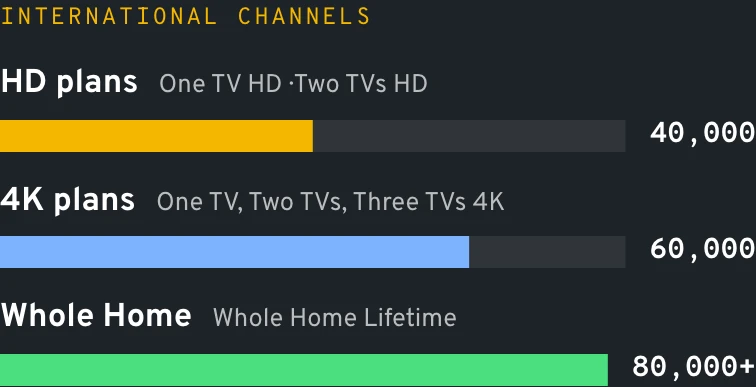
The catalog lives there too. Our channel and movie catalog covers sports, news, kids, documentaries and diaspora languages from Spanish to Punjabi, with 40,000, 60,000 or 80,000+ international channels depending on the plan. Switch apps tomorrow and every one of them follows you, because they belong to the line, not the player.
Owners of a MAG box get the same catalog through a portal. Our MAG box setup notes show where the portal address goes.
Try it
Full HD next to 4K
Full HD
4K
Illustration of the extra detail, not a broadcast.
Mile7.3
Twelve months with IPTV service providers
A year with one of the IPTV service providers you can actually reach
Checkout: the first half hour
Once payment clears, an email carries your Xtream codes and an M3U link, typically 5 to 30 minutes later. Nothing in the inbox? Check the promotions or spam folder, then text us the address you used.
Evening one: the first channel
Most people install a player app on a Firestick or smart TV, paste the details and are watching within twenty minutes. If a step looks different on your screen, send a photo and we point at the right menu.
Week one: fine-tuning
Set the guide offset for your time zone, build a favorites row, hide the language groups you never use. Small habits like these turn a list of 60,000 entries into a TV that feels like yours.
Day 60: the refund window closes
Up to that point any purchase can be returned on request by WhatsApp or email. After two months of real evenings, you know whether the service belongs in your house.
Before the anniversary: the reminder
A WhatsApp message arrives ahead of expiry so you decide calmly, not mid-game. Whole Home Lifetime owners skip this moment entirely, since their line has no end date.
Data
A year with us, and the years after
Real prices, simple sums. No renewal on lifetime plans.
Mile8.0
The technology
What internet protocol television providers are, in plain terms
Internet protocol television means TV pictures sent as data packets over an IP network instead of through a coaxial cable or a satellite signal. The Wikipedia entry on IPTV covers the engineering in depth.
Two families of internet protocol television providers exist. Phone and broadband companies sometimes run a managed version inside their own network, feeding a rented set-top box. The second family, ours included, delivers over the open internet to player apps on devices people already own.
For anyone choosing between IPTV service providers, the difference is practical. Managed systems lock you to one company's box and one address. Over-the-top delivery follows your login to any TV, phone or laptop, in any time zone, which is why renters and RV owners lean toward it.
Try it
Setup by device
Fire TV
Install a player app on the stick
Open it and pick Xtream codes
Type server, username, password
Load the guide link if asked
Android TV
Get a player app from the store
Add the login or the M3U link
Paste the guide (EPG) link
Set the guide offset to your zone
Apple TV, iPhone
Install a player app from the App Store
Add Xtream codes from the email
Turn on the guide in settings
Lock 18+ with your PIN
MAG box
Send us the MAC from the sticker
Open Settings › Servers › Portals
Type the portal URL from the email
Save and restart the box
Mile8.7
Mile9.4
Provider questions, answered short
Does the provider make the app I install?
No. IPTV Smarters Pro, TiviMate, IBO Player and similar players are made and licensed by independent developers. What we hand you is the line, typed into whichever of them you like, so changing players never means a new purchase.
Can I use one IPTV provider on several TVs?
Yes, as many as your plan counts. The single-device lines are One TV HD and One TV 4K; their 2-screen versions let two TVs play together; Whole Home Lifetime stretches to four.
Can I switch providers without new hardware?
Yes. The stick, the TV and the player app stay the same; you only replace the login inside the app. Most people move their favorites list over in a few minutes.
Is there a charge for equipment or installation?
We never do. No box rental, no installer visit, no contract: the login runs on hardware sitting in your living room right now.
Where do your streams come from?
From dedicated, load-balanced servers in Europe. Viewers in every US time zone connect to them, and the guide follows the time offset you choose in your app.
What does a provider need from me to set up a MAG box?
Just the MAC address printed on the label under the box. Send it on WhatsApp and we answer with the portal URL to enter in the box's system settings (menu names differ by model).
Do I need a VPN?
No. A VPN link comes with every plan for those who like one, and streams play normally with it switched off.
What if the service does not suit my home?
Changed your mind before the window shuts? Tell us in the chat or in an inbox message and the charge is reversed, with no form to fill.
Name the TV, the stick or box plugged into it and the number of screens that play together. We answer with a plan suggestion and the player app we would install on that hardware.