The best IPTV for sports is the one that holds up at the four moments a fan actually notices: a sharp picture when the ball is in the air, a guide that shows kickoff in your own time zone, a replay for the game you missed, and a second screen when two games overlap. Our 4K plans and Whole Home Lifetime are built around those four, inside the player app you already use.
In numbers
Sports on one line, in numbers
60,000+
international channels on One TV 4K
4K
Ultra HD on the 4K plans and Whole Home
7days
of catch-up on Whole Home Lifetime
4
screens at once on Whole Home
Mile1.0
What fans need
What makes the best IPTV for sports in a US home
Sport is the hardest job an IPTV line does. A sitcom can hide a soft picture; a deep pass on third and long cannot. Fans also tune in at the same minute, so a provider's servers face their real exam at 1 pm Eastern on a fall Sunday, not at midnight on a Tuesday. Any line that wants to be called the best IPTV for sports has to get through that hour.
So when a customer asks us for the best IPTV for sports, we point at the parts that carry that load: load-balanced servers in Europe, a 4K stream on the 4K and Whole Home plans, a guide that reads in your zone, and catch-up so a Pacific overtime is still waiting at breakfast.
Leagues are listed as sports, never as promises. Your league's games appear when they are carried by the international channels in the list, and the list runs deep: the entry plan alone carries 40,000 international channels and Whole Home goes past 80,000. The full breakdown sits on our channel and movie catalog page.
Plans
Sports-ready plans, paid once a year or once for good
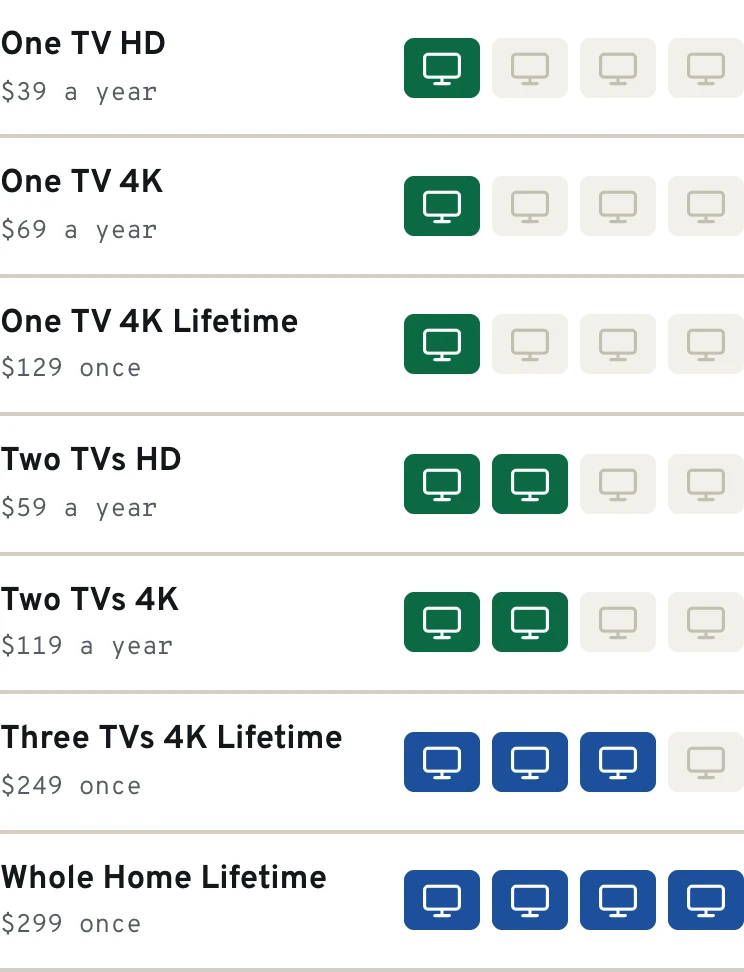
Whichever line becomes your best IPTV for sports, it carries the EPG guide, a VPN link and PIN parental control, and runs in any player app. For sport, One TV 4K is where the picture moves up to Ultra HD; Whole Home Lifetime adds the extra screens and the week-long replay.
Early and late afternoon windows, the Sunday night game, Monday and Thursday nights, then the big game in February
On Saturday evening, add the channels showing your region's games to Favorites so Sunday takes two clicks
Saturdays, Aug to Jan
College football
Slates that run from noon Eastern to past midnight, then bowl season over the holidays
The late West Coast kickoff can wait for Sunday coffee on the three-day replay of the 4K plans
Weeknights, Oct to June
NBA and NHL
Two long regular seasons that overlap for months, then playoffs into early summer
If two people follow different leagues, a two-screen option saves the remote war
Mid-March
College basketball
The tournament's opening Thursday and Friday stack dozens of games, many at the same hour
This is the week Whole Home Lifetime's four screens were made for
April to October
Baseball (MLB)
Six months of evening games plus afternoon starts on getaway days
Baseball is a nightly three-hour habit, so give the TV a cable to the router if you can
Weekend mornings
Soccer and MLS
European kickoffs at 7:30 am Eastern (4:30 am in California), Latin American leagues at night, MLS on Saturday evenings
Replay turns a pre-dawn kickoff into a brunch game
Late Saturdays
MMA and boxing
Main cards that begin late on the East Coast, on the nights a channel in our list has the card
Check the guide that afternoon; fight cards shift by the hour
Illustration
Game night in the guide
TV guide
7:00 pm8:00 pm9:00 pm10:00 pm
Sports 1
Overtime TalkMatchday Build-UpNight Game
Sports 2 4K
Fight Night PreviewRingside ClassicsLate Rounds
Movies HD
Harbor LightsThe Long Drive
News Int.
Morning DeskWorld HourMarket WrapNight Desk
Kids
Paper RocketsMoon GardenStory Bus
Illustration. Genre channels and program names are made up.
Mile2.4
Time zones
One kickoff, four clocks across the country
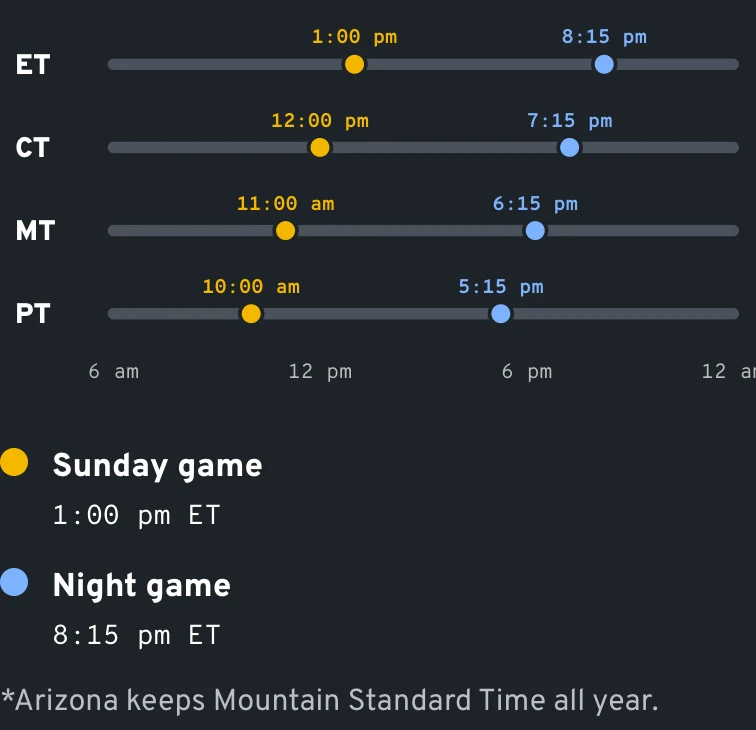
Even the best IPTV for sports feels wrong when the guide shows Eastern times in Denver. The servers don't care where you live, but your guide should. Set the device clock to your zone once and every start time reads in local time. Here is a Saturday soccer match from Europe, kicking off mid-afternoon in England, as it lands from coast to coast.
ET
10:00 am
A brunch-hour start in New York and Atlanta; the final whistle comes around noon
CT
9:00 am
Chicago and Houston watch over breakfast, unless the kids' own Saturday games get in the way: then the replay waits for the afternoon
MT
8:00 am
Denver gets an early start; Phoenix, without daylight saving, sees 7:00 am until early November
PT
7:00 am
Los Angeles and San Diego wake up for it. The earliest European slots begin before sunrise on the West Coast, so replay covers those mornings
Data
One start, four clocks
Mile3.1
Catch-up
Late games, early games and the replay button
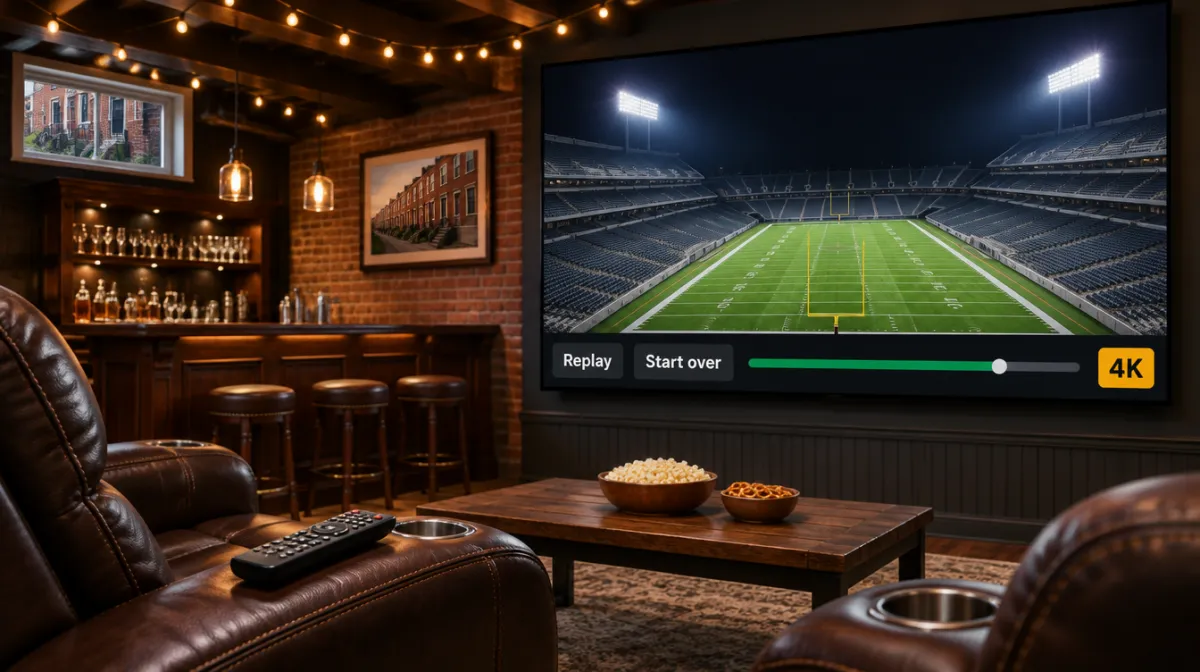
An 8 pm Eastern tip-off is 5 pm in Seattle, when plenty of people are still commuting. One TV 4K keeps three days of catch-up and Whole Home Lifetime keeps seven, so you open the program in the guide, rewind to the opening whistle and play it as if it were live. For fans out West, that replay window is the part of the best IPTV for sports they lean on most.
Mute score notifications on your phone first. Fans who watch later say a push alert is the only thing that ever spoils it.
In apps that support catch-up, past programs carry a small rewind or clock icon in the guide; the label differs by app version. Our setup and TV guide walkthrough shows where the guide settings sit in each player. The US time zone map is handy when family in Arizona or Hawaii follow the same game from their own couch.
Mile3.8
Which plan is the best IPTV for sports in your household?
Same servers and the same IPTV sports categories on every plan. What changes the answer to best IPTV for sports in your house is picture, replay and the number of screens.
One TV HD, $39 a year
One TV 4K, $69 a year
Whole Home Lifetime, $299 once
Picture
Full HD
4K Ultra HD
4K / Full HD
International channels
40,000
60,000
80,000+
Catch-up (replay)
No
3 days
7 days
Screens at once
1, or 2 with the $59 option
1, or 2 with the $119 option
Up to 4
Dedicated server
No
No
Yes
Fits
One fan, a 1080p TV, games watched as they happen
A 4K TV and a fan who often watches late
A house that splits Sunday across rooms, plus tournament weeks
Data
Speed for one or two 4K games
Mile4.5
A fall weekend
What one 4K line handles from Saturday to Monday
Saturday, 11:45 am ET
College kickoff on the living-room 4K set, with the guide already showing Eastern times because the stick's clock is right.
Saturday, 10:30 pm ET
The late West Coast game runs past bedtime. It sits in catch-up for three days, untouched.
Sunday, 7:30 am
Coffee, last night's replay from the first snap, phone face down on the counter.
Sunday, 1 pm ET
Pro football window. If someone wants a different game in the den, that is the moment a two-screen option or Whole Home pays for itself.
Monday night
One game, one screen, Ultra HD, and the alarm set for six.
Illustration
Saturday to Monday on one line
Sports 1Living room
News Int.Kitchen
Movies HDBedroom
KidsDen
4 of 4 screens playing · Whole Home Lifetime
Illustration.
Mile5.2
Game-day fixes our WhatsApp team sends most often
Symptom
Likely cause
Fix
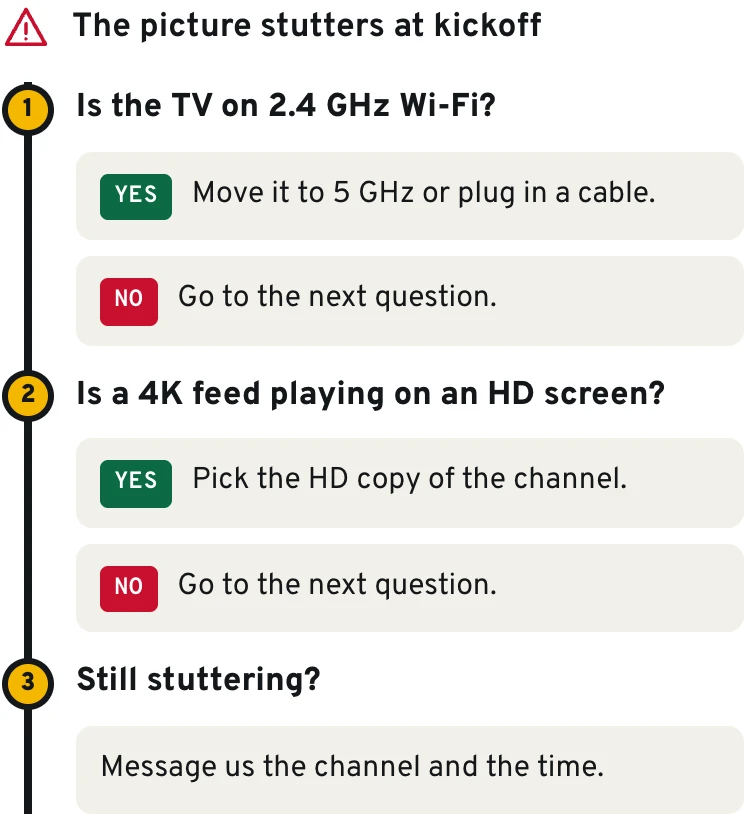
Picture stutters right at kickoff
The stick shares 2.4 GHz Wi-Fi with every phone in the house
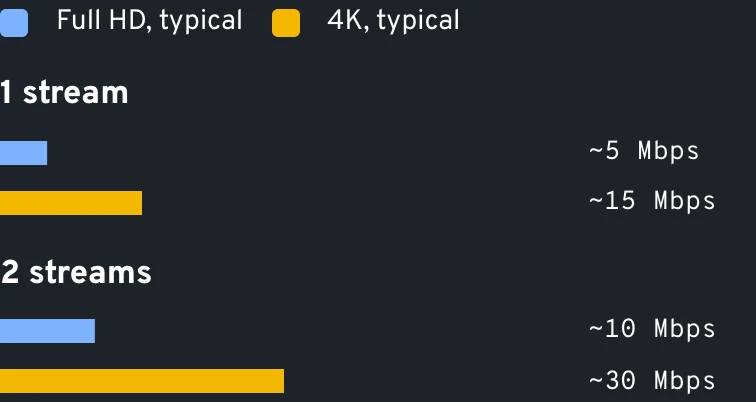
Pair the TV with the 5 GHz name on your router, or cable it; a 4K game eats around 15 Mbps
The guide says the game started hours ago
Device clock or time zone set wrong, so the EPG is shifted
Correct the zone in the stick's system menu; only touch the player's own EPG shift if a gap remains
A friend's text beats your touchdown
Every stream runs a little behind the broadcast and some apps add a long buffer
Lower the app's buffer size one step and silence score alerts while you watch
The channel opens on a black screen
Event channels often stay dark until the game starts
Check the start time in the guide or try another channel in the same sports group
Picture looks soft on a 65-inch TV
An HD feed on One TV HD, or the app picked a lower-quality version
Choose the copy of the channel tagged 4K or FHD in its folder; the sharper copies are part of every 4K line and of Whole Home
Diagram
Find the fix in three questions
Mile5.9
Your first week: what to look at on game nights
With sixty days to ask for your money back, you can decide on actual game nights whether this is the best IPTV for sports for your home. Here is what we ask every new sports customer to look at.
0/6 checked
Mile6.6
Data
When two games overlap
Mile7.3
Sports questions fans send us before buying
I mostly watch football. Which plan should I pick?
One TV 4K, $69 a year. Football is where the 4K feeds and the three-day replay show their worth: late kickoffs, Saturday overflow, the game you skipped for a birthday party. On a 1080p set where you watch games as they air, One TV HD at $39 a year does the job.
Can you promise my team's games will be there?
No honest seller can, and the best IPTV for sports is the one that tells you so up front. We list sports and leagues by category, and games appear when the international channels in the list carry them. If one league matters most, ask us on WhatsApp before you pay, then look at its category during your first week; the 60-day refund covers you.
What internet speed do I need for 4K sports on IPTV?
A single Ultra HD game is comfortable at around 15 Mbps, and HD games ask much less. Run two 4K games side by side on Whole Home and you want about 30 Mbps, before the kids' tablets join in.
Can two people watch different games at the same time?
Yes, with a plan that has more than one connection: the two-screen options at $59 or $119 a year, Three TVs 4K Lifetime at $249 once, or Whole Home Lifetime with up to 4. Our guide to watching on several TVs explains how connections are counted.
Is there sport in Spanish, or cricket for South Asian fans?
Yes. The lists include Spanish-language sports channels with Latin American soccer, plus South Asian channels that follow cricket, all inside the same login as the US sports categories.
Is a lifetime plan worth it if I follow every season?
Often, yes. If football fills your fall, hockey your spring and baseball your summer, Whole Home Lifetime at $299 once costs less than five years of One TV 4K at $69 a year, and it adds the dedicated server, four screens and the 7-day replay. A fan who only watches one season a year is well served by the 4K plans.
Which device is best for sports on IPTV?
A Firestick 4K or a Google TV stick on 5 GHz Wi-Fi, or any Android box on Ethernet. Many fans run TiviMate for its guide; it is made by its own developer, who may charge a small fee for it. Our Fire TV setup page walks through the install.
Set up IPTV for sports before the next big weekend
Every line is listed with its price on our full plan lineup. Not sure? Text us the leagues you follow and we will name the best IPTV for sports in your house. You can settle by major card, Apple Pay or Google Pay, and paying by bank transfer takes 10% off the price.