A plan with 60,000 IPTV channels does not mean 60,000 different shows to scroll past. It means the channel feeds of dozens of countries, sorted into folders by country, language and genre, with HD, Full HD and 4K versions of the busiest ones, plus a library of movies and series you can start any time. Here is what our three line sizes really hold, and how a US household finds its own corner of them in one evening.
Line sizes
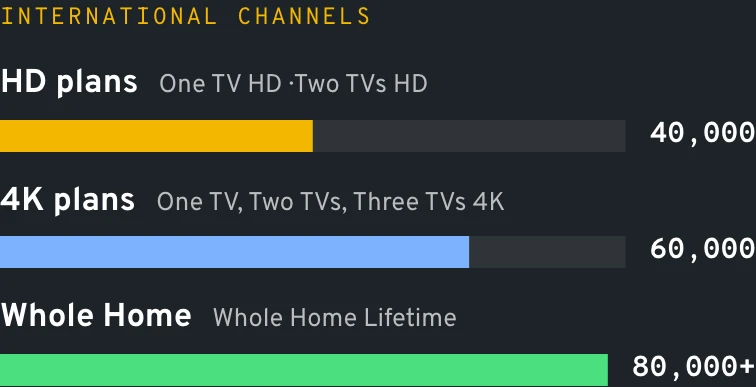
Pick your list size: 40,000, 60,000 or 80,000+ IPTV channels
Each card names a channel count, an on-demand library size and a picture quality. Behind all of them sit the same servers, the same player apps and the same people answering WhatsApp every day of the week.
Most of a big list of IPTV channels is the world's television: national, regional and local channels from across the Americas, Europe, the Middle East, Africa and Asia. A channel popular in three countries often appears three times, once per country folder, and the busiest ones come in two or three picture versions.
Then come event channels, a part of IPTV channels that confuses new customers. They sit quiet most of the week and switch on for a game, a race or a fight, which is why a sports folder can look half empty on a Tuesday morning.
In practice a family uses a small slice of its IPTV channels. The households we help settle on a Favorites row of thirty to eighty, and the size of the full list matters because it decides whether your slice is in there at all: Gujarati news, Polish league soccer, a Filipino variety show. More IPTV channels simply means better odds that your niche made the cut.
Data
Channel count by tier
Mile1.7
Folders
How the IPTV channels list is organized
US and regional
Folders of American news, entertainment and regional channels, so a family in Texas and one in Oregon each find the stations they grew up with.
Sports
Groups per sport and per country, from pro and college football to soccer, hockey, motorsport and cricket, plus the event channels that wake up for a single game.
Countries and languages
Folders named by country prefix, so Mexico, India, the Philippines, Poland or Nigeria each have a place you can open, scroll and add to Favorites.
Movies and series
Channels that run films and box sets around the clock, kept apart from the on-demand library you start from the first second.
Kids and family
Cartoons, preschool and teen channels in English and Spanish, easy to keep on a child's profile while the PIN closes everything else.
News and documentaries
Rolling news from many countries and documentary channels on nature, history and science, handy for a TV that runs in the kitchen all day.
Illustration
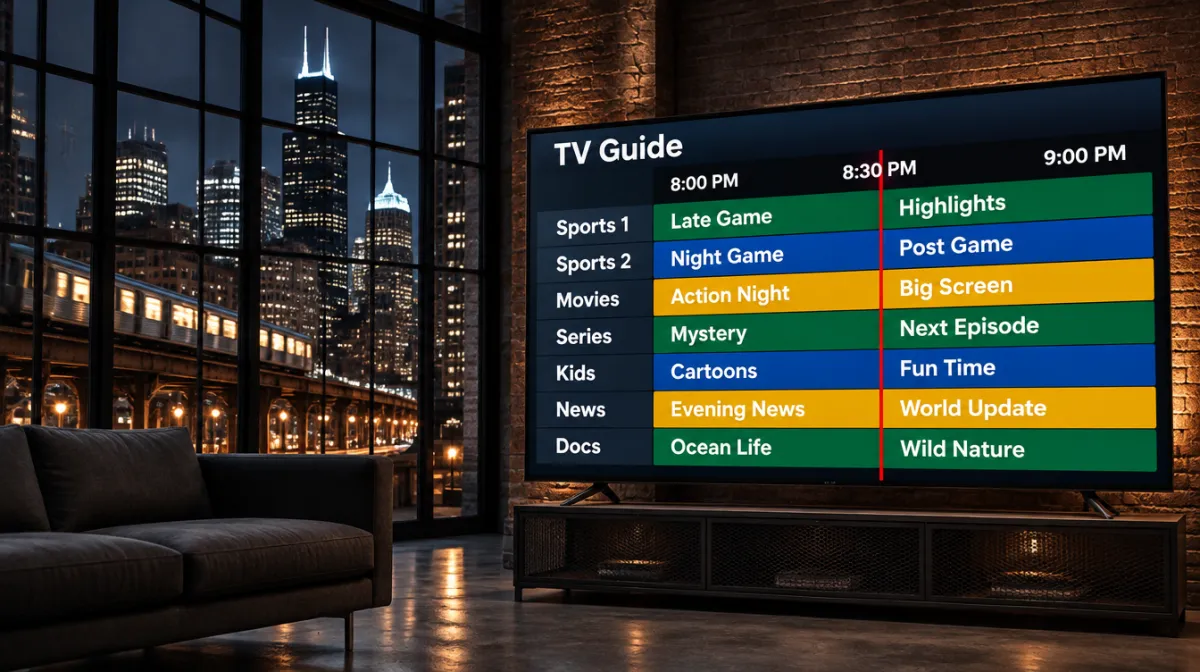
How folders and the guide look
TV guide
6:00 pm7:00 pm8:00 pm9:00 pm
Sports 1
Overtime TalkMatchday Build-UpNight Game
Sports 2 4K
Fight Night PreviewRingside ClassicsLate Rounds
Movies HD
Harbor LightsThe Long Drive
News Int.
Morning DeskWorld HourMarket WrapNight Desk
Kids
Paper RocketsMoon GardenStory Bus
Illustration. Genre channels and program names are made up.
Mile2.4
Languages US households ask us about first
These are the folders our customers open in their first hour. Folder names follow the provider's prefixes and vary a little by app.
Spanish
Folders for viewers from Mexico, Puerto Rico, Cuba and the Dominican Republic through to Colombia and Argentina: novelas, talk shows, regional news and weekend soccer.
South Asian
Serials, news and devotional programming in Gujarati, Tamil, Telugu, Urdu, Punjabi and Hindi; the cricket feeds sit one folder over, under sports.
Filipino and Asian
Pinoy variety and teleserye channels, and Mandarin, Cantonese, Vietnamese and Korean folders for homes where grandparents watch in their first language.
Arabic
News, series and religious programming from across the Arab world, with Ramadan schedules showing in the guide.
Caribbean and Haitian
Jamaican, Trinidadian and Haitian channels in English, Creole and French, plus West African folders for Nigerian, Ghanaian and Ethiopian viewers.
European
Folders for Brazil and Portugal, Poland, Ukraine and Russia, Greece and Italy, most of them carrying their home country's soccer league.
Mile3.1
Side by side
IPTV VOD and IPTV movies next to the channels
The on-demand side works like a video store with no closing time: pick a title, press play, pause, come back tomorrow where you stopped.
One TV HD
One TV 4K
Whole Home Lifetime
Price
$39 a year
$69 a year
$299 once
International channels
40,000
60,000
80,000+
Movies and series on demand
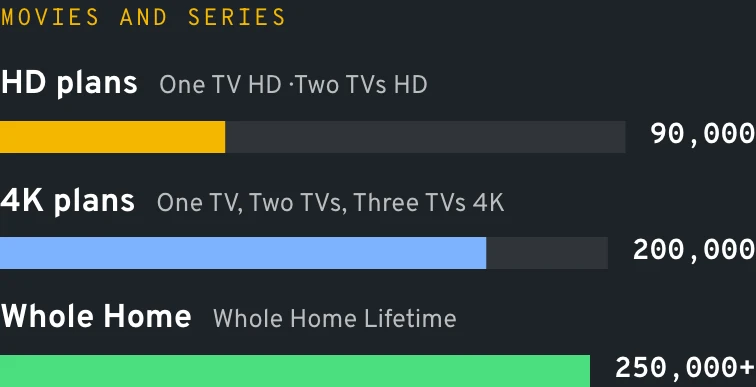
90,000
200,000
250,000+
Picture
Full HD
4K Ultra HD
4K / Full HD
Catch-up on past programs
No
3 days
7 days
Adult channels and movies (PIN)
3,000
6,000
9,000
EPG guide
Included
Included
Included
Screens at once
1
1
Up to 4
Data
Movies and series by tier
Mile3.8
On demand
How the movie and series library behaves
The IPTV VOD section lives in its own menu, usually called Movies and Series; the wording depends on the player app. Titles are sorted by genre, by year and often by language, with a search box that works on titles and sometimes on actors.
Series open season by season, and most apps remember the episode you stopped on. Movie posters, a plot line and the running time come from the provider's database, so the shelf looks like a store rather than a file list.
Where a title carries extra audio tracks or subtitles, the player shows them in its playback menu. A Spanish-speaking grandmother and an English-speaking grandson can share the same movie night that way.
Data
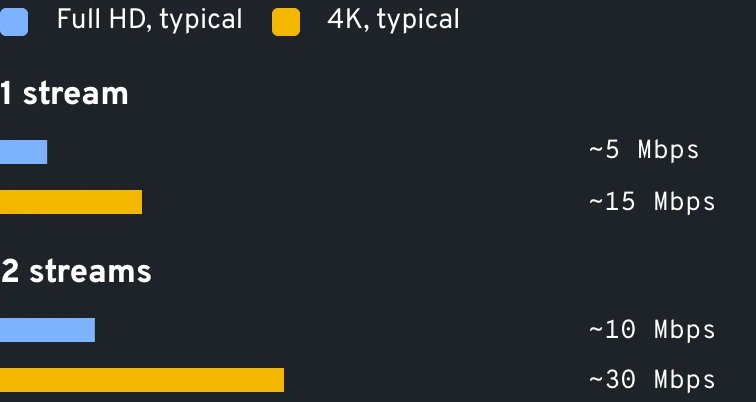
Speed per stream in 4K
Mile4.5
Mile5.2
18+
The adult section of the list
There is a separate adults-only catalog mixing channels and movies. One TV HD opens 3,000 of them, One TV 4K doubles that to 6,000 and Whole Home Lifetime reaches 9,000. A personal PIN, delivered alongside your login details, keeps it shut, and you may change or reset that code at any time.
The folder stays locked on every device until someone types the code, so a shared living-room TV or a teenager's tablet never shows it by accident. It is part of the plan, not an add-on.
Illustration
The PIN screen in front of the 18+ section
18+ section is locked
Enter your 4-digit PIN
1234567890⌫
Illustration. The PIN comes with your login and can be changed.
Mile5.9
Your first evening with 60,000 channels
Ten minutes of tidying on day one saves months of scrolling. This is the routine we walk new customers through on WhatsApp.
0/6 checked
Mile6.6
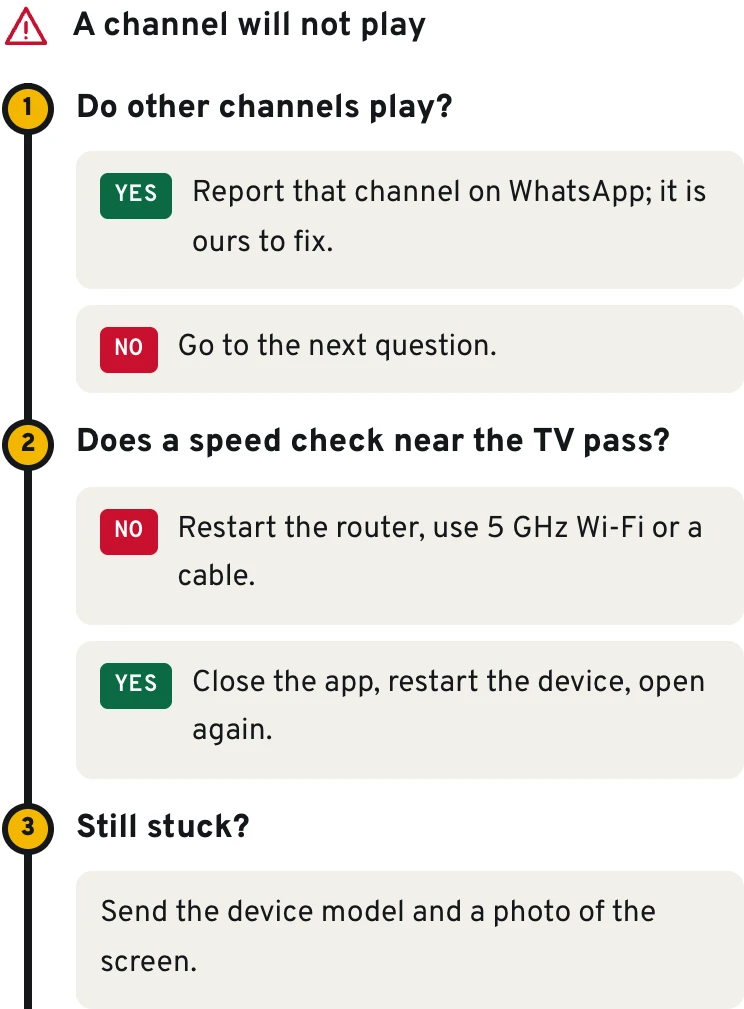
When a channel misbehaves, and the quick fix
Symptom
Likely cause
Fix
A favorite station vanished from its folder
It was renamed or moved during a list update
Refresh the playlist in the app, search its name, then add it to Favorites again
The guide is blank for one folder only
Those stations have no schedule data, or the EPG has not finished downloading
Give the app ten minutes after a refresh; if it stays empty, send us the folder name
Posters missing in Movies and Series
The app has not cached the library artwork yet
Open the section once on a good connection and let it load fully before browsing
The full list takes ages to open on an older stick
Tens of thousands of entries on a device with little memory
Hide unused country folders; the app then loads only what your home actually watches
Diagram
A channel misbehaves: three questions
Mile7.3
Questions about channels and the library
How many channels do I really get?
The number printed on your plan. One TV HD lists 40,000 international channels; One TV 4K raises that to 60,000 and Whole Home Lifetime passes 80,000. Country duplicates and picture versions are part of every large count, since one popular station may sit in several national folders.
Are American channels included, or only international ones?
Both live in the same list. US news, entertainment, sports and regional channels sit in their own folders alongside the rest of the world, and the guide shows their schedules.
Is IPTV VOD part of the price or extra?
Part of the price. The IPTV movies and series library is included in every plan, 90,000 titles on One TV HD up to 250,000+ on Whole Home, with nothing to rent or buy per title.
Can I check whether my language is in the list before I pay?
Yes, and we'd rather you did. Write the language or home country on WhatsApp and we reply with the folder names that carry it; once you buy, the 60-day refund still stands behind that answer.
Does the channel list change over time?
Yes, a list this size is alive: stations get added, renamed or moved between folders. Your player picks up the changes when it refreshes the playlist, which most apps do at launch or on a schedule you set in their settings.
Do channels work the same on every device?
The list is the same on a Firestick, a smart TV, an Apple TV, a phone or a MAG box. What changes is the app: some show the guide better, some handle 4K better. Our Fire TV page covers the most common setup.
We list leagues as sports; the games come with the channels that air them.
Sports folders are among the biggest in any list of IPTV channels, because they collect feeds from every country that broadcasts a league. We describe them as sports and leagues, never as a promise of a specific game. For season dates, time zones and replay tips, our page for sports fans goes deeper, and households splitting the evening between two TVs should read about multi-screen options.
For a wider picture of how the technology delivers those feeds, the video on demand article on Wikipedia is a good plain-English starting point.
Last exit before the plans
Find your corner of the list
Compare the three list sizes on the plans page, or message us the languages and sports you care about and we'll point to the plan that covers them.