This IPTV service FAQ gathers the questions US households send us most on WhatsApp, each answered in its first sentence and sorted into three parts: buying and paying, setup and devices, then watching and your account. If yours is missing, message us and a person replies, 7 days a week.
How to use this page
How this IPTV service FAQ is organized
Every entry started as a real chat. When the same IPTV service questions reach our WhatsApp week after week, from a retiree in Tampa or a student in Austin, they earn a place in the IPTV service FAQ, worded the way people actually type them. Answers stay short and point to a fuller page where one exists.
New to the idea itself? Internet Protocol television carries programs over the broadband line already coming into your home, so the coax outlet and the roof antenna stop mattering. Everything in this IPTV service FAQ starts from there and stays practical.
Data
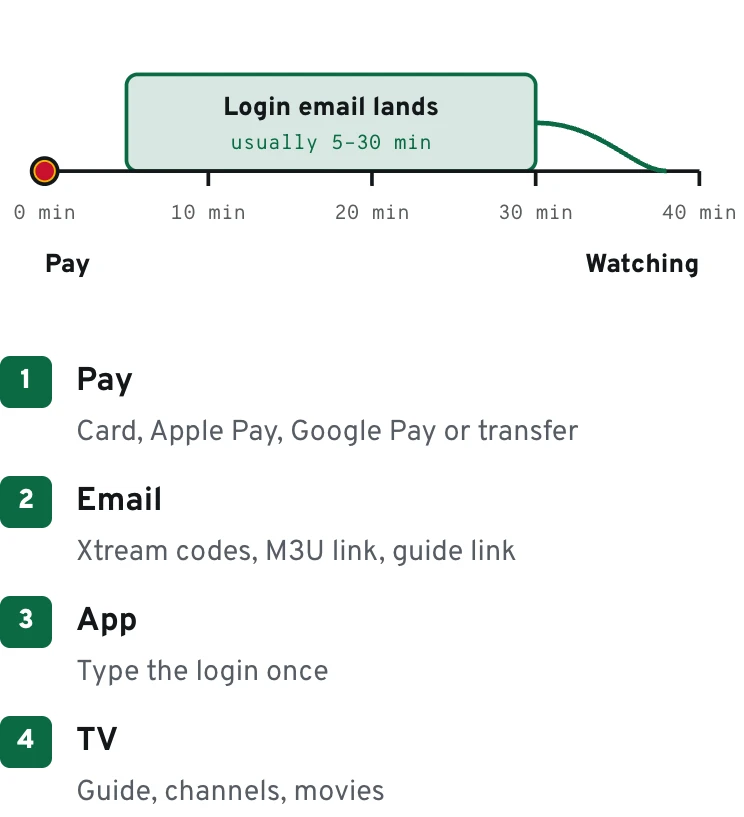
The order timeline in one line
IPTV service FAQ · part 1 of 3
Questions about buying and paying
What exactly am I buying?
A personal login that opens three things inside a player app: international channels, an on-demand library of movies and series, and a TV guide. Sizes grow with the plan, from 40,000 channels and 90,000 titles on One TV HD to 80,000+ channels and 250,000+ titles on Whole Home Lifetime, with One TV 4K in between at 60,000 and 200,000.
How much does it cost?
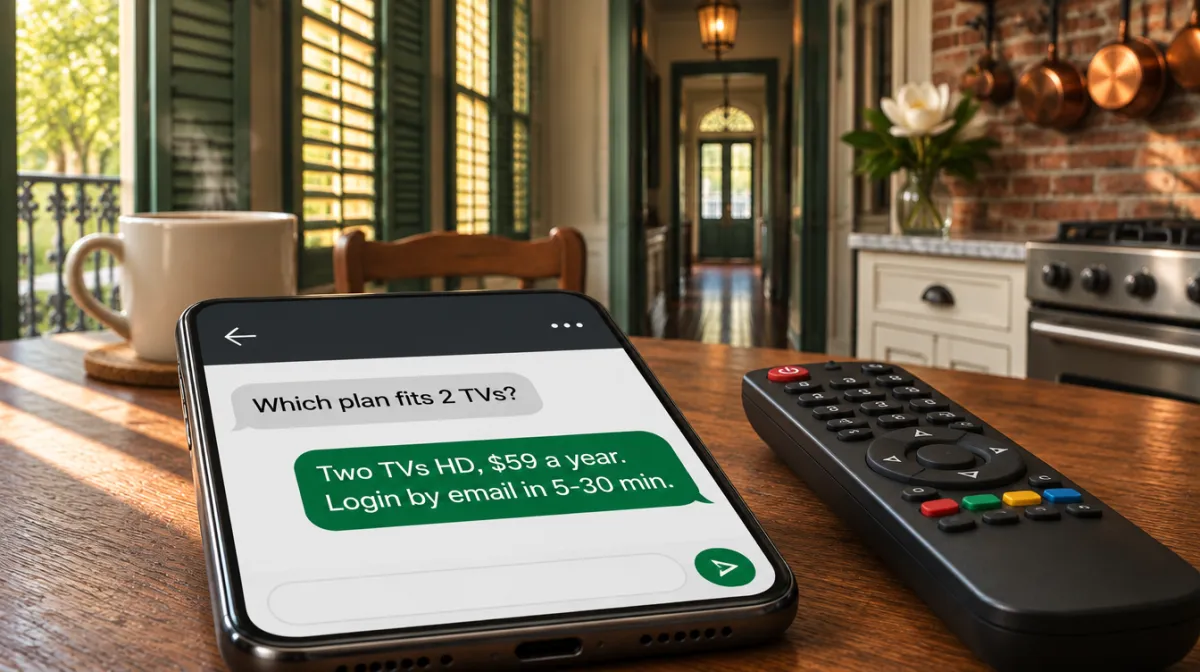
The headline numbers are $39 (One TV HD, twelve months), $69 (One TV 4K, twelve months) and $299 (Whole Home Lifetime, settled once). Four variants cover other homes: Two TVs HD at $59 yearly, Two TVs 4K at $119 yearly, One TV 4K Lifetime at $129 once and Three TVs 4K Lifetime at $249 once. Compare them on the plans page.
Which payment methods do you take?
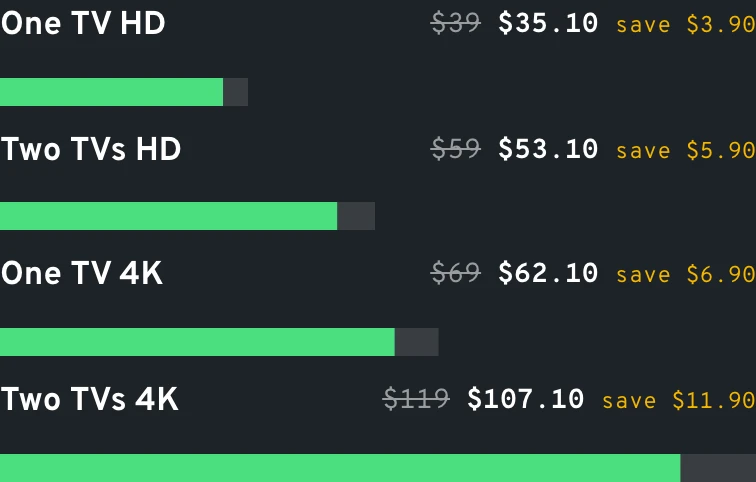
Tap Apple Pay or Google Pay on your phone, or type in a card from any major network. Prefer your bank? Transfers carry a 10% discount, so One TV 4K is settled with $62.10 and the lifetime Whole Home plan with $269.10. Either way the merchant name on your statement is a neutral one. The payment page lists every transfer amount.
Why only yearly or one-time plans?
So you pay once and stop thinking about it. A year-long plan comes with a WhatsApp nudge shortly before the end date, and the lifetime plans never ask for anything again, which suits people who are tired of a bill that creeps up every January.
How soon can I start watching?
Usually before your coffee gets cold. Logins leave our side 5 to 30 minutes after checkout, carrying Xtream details and an M3U link. No sign of it? Search your mailbox for our domain name, including the Promotions tab, before writing to us.
Can I get my money back?
Yes, any time within 60 days from the purchase date. Ask on WhatsApp or by email, mention the address you ordered with, and the 60-day refund page walks through the rest.
Can I see it on my own TV before paying?
That is exactly what the 60-day refund is for. Buy the plan you actually want, put it on the TV in your own den, watch a full weekend of games and shows, and if it does not earn its place, request the refund inside those 60 days.
Another question? Our team answers on WhatsApp, 7 days a week. Message us on WhatsApp
Data
Transfer prices for the yearly plans
IPTV service FAQ · part 2 of 3
Questions about setup and devices
Which devices does it work on?
Nearly anything with a screen and a player app. In US homes we mostly see Fire TV sticks, Google TV boxes and TCL or Hisense sets, Samsung and LG TVs, Apple TV with iPhones and iPads, Android phones, laptops on Windows or macOS, and the odd MAG box in a basement. Single-screen plans let one of them play at a time.
Which player app should I install?
Start with the one built for your hardware: TiviMate or IPTV Smarters Pro on a Firestick or Google TV, IBO Player or Set IPTV on a Samsung or LG, GSE Smart IPTV or VLC on Apple gear. Their developers own and license those apps, while our part is the login that goes into them.
Is a VPN needed?
Not for watching. Each plan still ships with a VPN link for anyone who likes to keep one on; set up the VPN app on the device, switch it on, and only then launch the player.
What internet speed do I need?
Plan on about 15 Mbps at the TV itself for a steady 4K picture; Full HD gets by on far less. Measure at the set around 8 pm, when the whole household is online: an Ethernet cable or the 5 GHz Wi-Fi band usually does more than paying your internet provider for a faster tier.
Does it run on a Roku?
Roku has no IPTV player of the common kind. The usual fix costs one HDMI port: add a Firestick or a Google TV stick to that television and flip the input when it is time to watch.
Do you support MAG boxes?
Yes. A MAG connects through a portal address rather than an app, so we need the MAC address from the sticker underneath. Text it to us and you get the portal to type in; the MAG setup page shows the menus.
The guide shows the wrong hours. What do I change?
Two settings. Let the device set its own clock, then shift the EPG offset in the player until tonight's 7 pm show sits at 7 pm in your zone, whether that is Eastern or Pacific. Our TV guide page shows where common apps hide that option.
Try it
Setup by device
Fire TV
- Install a player app on the stick
- Open it and pick Xtream codes
- Type server, username, password
- Load the guide link if asked
Android TV
- Get a player app from the store
- Add the login or the M3U link
- Paste the guide (EPG) link
- Set the guide offset to your zone
Samsung, LG
- Open the TV's app store
- Install a player app that takes M3U
- Enter the login in the app
- Restart the TV once
Apple TV, iPhone
- Install a player app from the App Store
- Add Xtream codes from the email
- Turn on the guide in settings
- Lock 18+ with your PIN
MAG box
- Send us the MAC from the sticker
- Open Settings › Servers › Portals
- Type the portal URL from the email
- Save and restart the box
IPTV service FAQ · part 3 of 3
Questions about watching and your account
How many screens can play at once?
Between one and four, set by your plan. Think of a family where Dad watches the game downstairs and the kids watch cartoons upstairs: that is two connections, so a two-screen variant fits, while a three-TV home looks at the $249 three-screen lifetime option and four rooms at Whole Home Lifetime. Our multi-screen explainer covers what counts as a connection.
What is catch-up?
A rewind button for the guide. Programs that already aired stay playable for 3 days on One TV 4K and 7 days on Whole Home Lifetime, on channels marked for replay, which rescues a late tip-off on the East Coast for anyone who fell asleep at halftime.
Can I keep the kids away from some content?
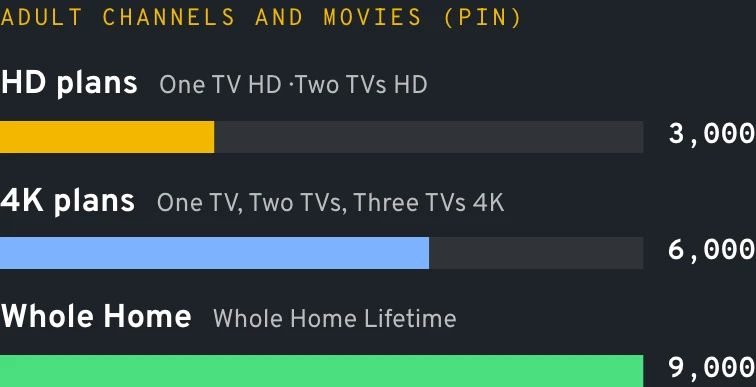
Yes, on two levels. Any plan lets you set a parental PIN on chosen categories. Separately, the 18+ area (3,000 adult channels and movies on HD, 6,000 on 4K, 9,000 on the Whole Home line) opens only with its own code, mailed to you alongside the login, and you can swap that code for a new one whenever you wish.
Will my league's games be on?
Your league is covered as a genre: the NFL and college football, NBA, MLB, NHL, MLS, plus soccer from Europe and Latin America each have their own sports groups. Whether a particular matchup appears depends on what the international channels in the list carry that day, so a quick look at the guide before game time tells you.
What happens when a yearly plan ends?
Nothing sneaks up on you. A WhatsApp note arrives ahead of the end date; renew and the login carries on unchanged, ignore it and access closes quietly on that day.
Can I take the login on vacation or in an RV?
Yes, it is tied to your device count, not your street address. Snowbirds take it to Florida, families take it to the lake house, and RVers use campground Wi-Fi or a hotspot; just keep the same number of screens playing as at home.
A channel stopped working. What now?
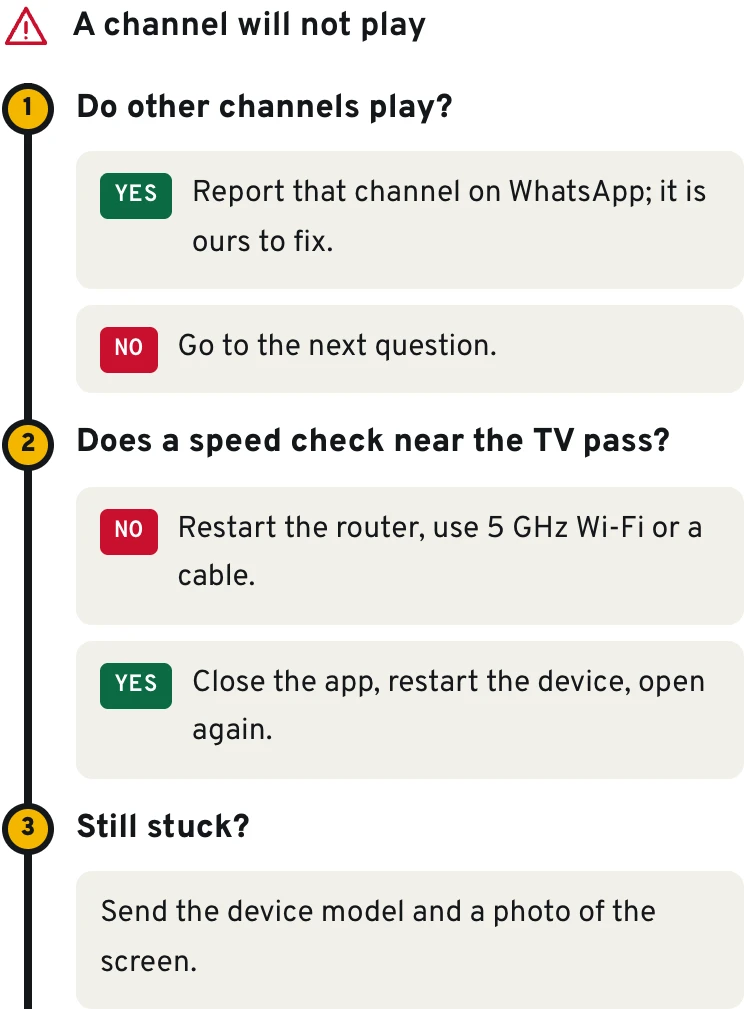
Flip to another channel in that category first, because a source occasionally pauses. Still dark after a few minutes? Tell us on WhatsApp which channel, at what time and on which device, and we chase it from our side.
Data
The 18+ catalog by tier
Illustration
The PIN screen in front of the 18+ section
18+ section is locked
Enter your 4-digit PIN
When this IPTV service FAQ runs out
The IPTV service FAQ covers the common cases. For anything else, this order gets you the fastest fix.
Note the device and app
Something like "Google TV Streamer, IPTV Smarters Pro". Half the setup puzzles we solve hinge on that combination.
Take one photo
Snap the screen showing the error or the odd behavior, with the remote out of the frame.
Message us on WhatsApp
Send both, plus the email address you ordered with. A person replies, any day of the week.
Diagram
Find the fix in three questions
Last exit before the plans
Ready when you are
If this IPTV service FAQ settled your doubts, choose a plan and set it up tonight. If it did not, ask us directly; every message is read by a person.