Choosing an IPTV service for Firestick households can rely on comes down to three plain things: a line that loads a big channel list without choking an 8 GB stick, a player app that suits your model, and people who answer when the Downloader screen stops making sense. This page is how our support team sets that up on every Fire TV model sold in the US, from the Lite in a dorm room to the Cube in a finished basement.
Mile1.0
Before you pay
What a good IPTV service for Firestick homes has in common
An Amazon Fire TV stick is a small computer with tight storage, a modest chip and a Wi-Fi antenna that usually hangs behind the set, the worst spot in the room. So an IPTV service for Firestick has to open a large list quickly, keep its guide data lean and hold steady on a 5 GHz signal. Channel counts come second.
The line we sell as an IPTV service for Firestick households is shaped around that. The Xtream login serves 60,000 international channels in tidy categories, so most players load them in sections and a Lite does not freeze trying to swallow the whole list at once. The EPG guide rides on the same login, and someone on WhatsApp who knows Fire TV menus by name replies 7 days a week.
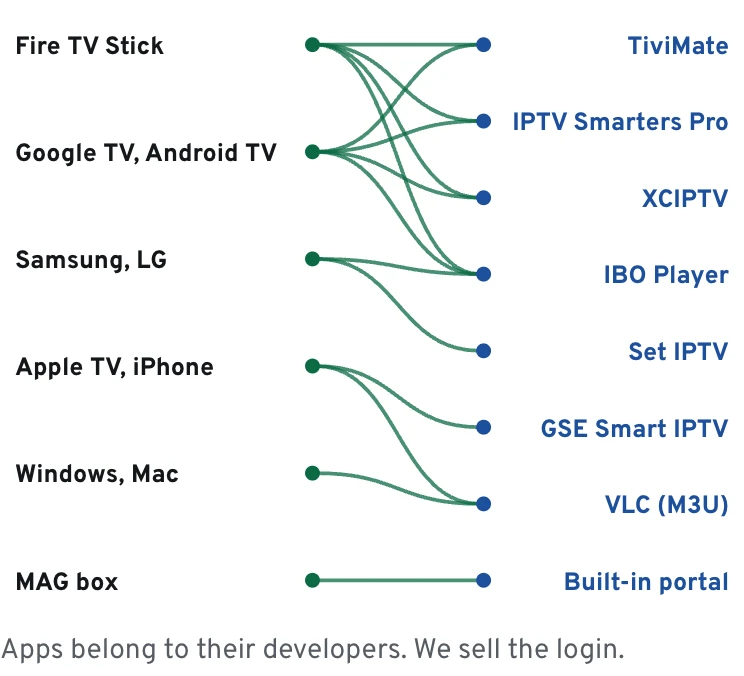
Apps are not our product, and we never put our name on one. IPTV Smarters Pro, TiviMate, IBO Player and XCIPTV are built and licensed by their own developers; what you buy from us is the account you type into them. Move from one player to another as often as you like and the same login comes along.
Plans
IPTV service for Firestick plans, matched to the stick
One TV HD fits the Lite and the HD stick. One TV 4K needs a 4K stick plugged into a 4K TV to show what it carries. Whole Home Lifetime covers up to 4 screens, for homes with a stick behind every set.
The model name is printed on the box and listed in the stick's About screen. It decides how much of a Firestick IPTV service that generation of hardware can actually put on screen.
Fire TV Stick Lite
Outputs 1080p at most, with 8 GB of storage. One TV HD runs comfortably; a 4K plan adds nothing the Lite can show.
Fire TV Stick (HD)
Also 1080p, with a remote that handles TV volume and power. A sensible pairing with One TV HD in a bedroom or dorm.
Fire TV Stick 4K
Sends 4K with HDR to the TV. The entry point for One TV 4K, as long as the set itself is 4K.
The step-up 4K stick
Amazon's higher 4K model adds faster Wi-Fi and more storage. Our pick when one stick holds 60,000 channels and a few other apps.
Fire TV Cube
The one Fire TV streaming device with a network port built in. Run a cable from the router and 4K games hold up through a crowded evening.
TVs with Fire TV inside
Several makers ship TVs running Fire OS. Setup matches the sticks; check the panel resolution before choosing 4K.
Data
What each device takes
Device
Xtream codes
M3U link
Portal + MAC
4K
Fire TV Stick
yes
yes
no
4K / 4K Max
Android TV, Google TV
yes
yes
no
4K models
Samsung, LG smart TV
Some apps
yes
no
4K sets
Apple TV, iPhone, iPad
yes
yes
no
Apple TV 4K
MAG box
no
no
yes
Newer models
Logins come as Xtream codes and M3U; MAG gets a portal.
Mile2.4
Diagram
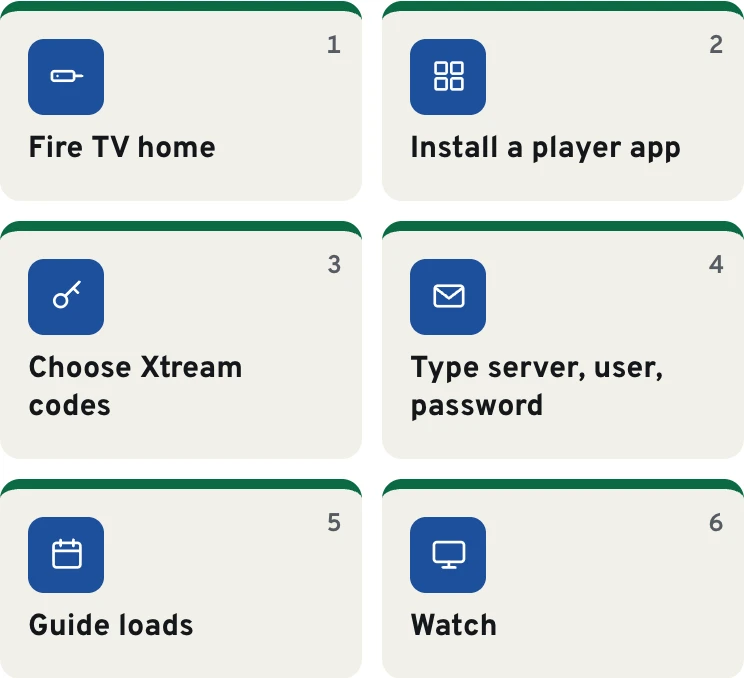
Fire TV setup, start to finish
Mile3.1
Installing a player app on Fire TV, step by step
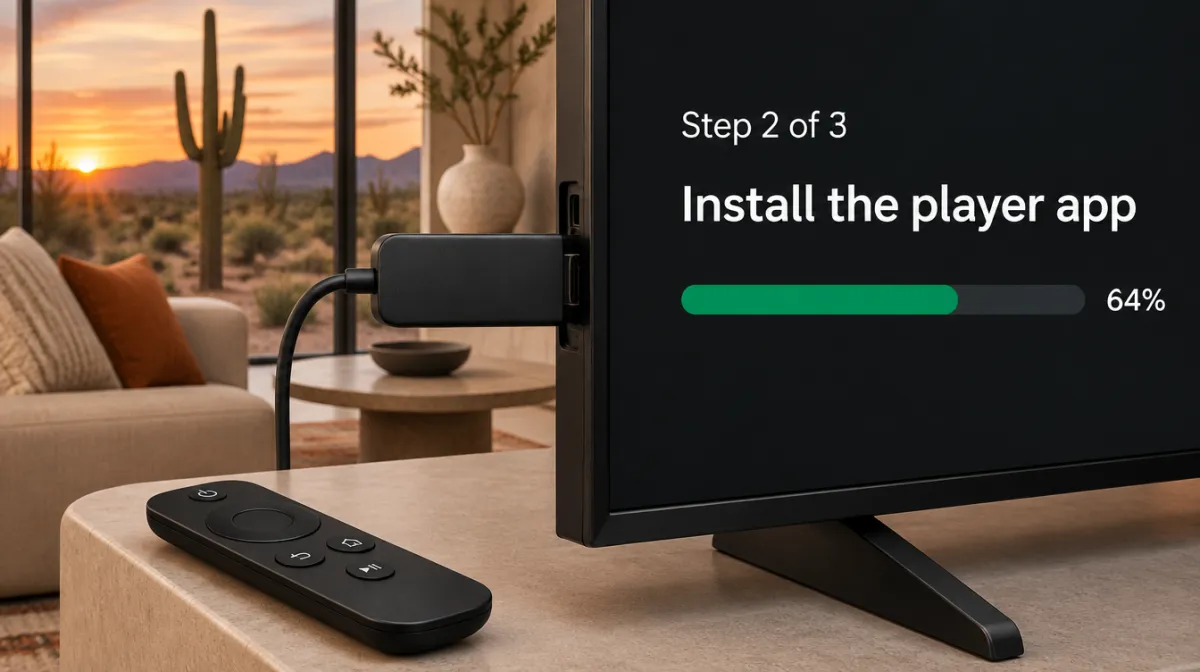
This is the route behind most of the Firestick IPTV service installs we support. Menu names shift a little between Fire OS versions, but the order holds. Give it fifteen minutes the first time; the second stick takes two.
Turn on Developer options
From the home screen go to Settings, My Fire TV, About. With the device name highlighted, hit select seven times in a row; a pop-up says you are now a developer, and Developer options appears back in the My Fire TV menu.
Install Downloader
Back on the home screen, use the magnifier to find Downloader, the orange app with a down arrow, and press Get. Think of it as a tiny browser whose only job is pulling files onto the stick.
Allow Downloader to install apps
One level up, in Developer options, find the unknown-apps entry and flip the switch beside Downloader only. Everything else on that list should stay as it is.
Fetch the player
In Downloader, key in the short code or web address listed on the player developer's official site, not one lifted from a video comment. Accept the install, then let Downloader delete the leftover file so the stick keeps its space.
Illustration
Typing the login into a player app
Add user · Xtream codes
Add user
Illustration of a typical player app screen.
Enter your line
Launch the player and look for the Xtream Codes option (labels differ, such as Login with Xtream or Xtream API). Copy the three details we emailed you (server address, user name, password) one character at a time, because capitals count.
Let the list and guide load
The first launch reads every category and the TV guide. On a Lite that takes a minute or two; leave the remote alone while the bar moves.
Pin it to the home row
Hold the center button on the app icon, choose Move, and park it at the front of your apps row so the whole family finds it.
Stuck on one of these screens? Send a photo of the TV on WhatsApp and we will point at the next button. Our setup and TV guide walkthrough covers the same login on every other device in the house.
Mile3.8
Player apps Firestick owners use, side by side
Any IPTV service for Firestick still needs a good player in front of it. All four accept our Xtream login or M3U link; they are made and licensed by their developers, and some charge their own small fee for extras, which is between you and the developer. Menus vary by app version.
IPTV Smarters Pro
TiviMate
IBO Player
XCIPTV
Usual install route
Developer site through Downloader
Developer site through Downloader
Appstore or developer site
Developer site through Downloader
Feel on a Lite
Light, big buttons
Smooth once the list is cached
Light
Light
TV guide grid
Yes
Yes, the richest grid
Yes
Yes
Catch-up on the 4K plans and Whole Home
Yes
Yes, in the developer's paid tier
Yes
Yes
Who it suits
First setups, parents and grandparents
Sports fans who live in the guide grid
Homes that also run it on a smart TV
People who like to tweak buffer settings
Diagram
Which player app runs where
Mile4.5
In the living room
Getting 4K from an IPTV service on Firestick without stutter
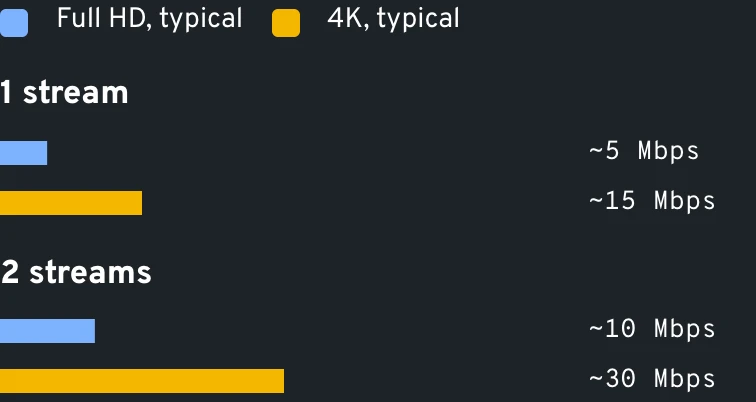
Even a strong IPTV service on a Firestick looks soft if one link in the chain is missing: a 4K stick, a TV input that accepts 4K (often labeled on the back, usually HDMI 1 or 2), and about 15 Mbps reaching the stick itself. A speed app on your phone measures the phone. Run a speed-check app on the stick, with the TV in its usual spot.
Use the short HDMI extender from the box. It pulls the antenna away from the TV's metal back and often helps more than a new router. If the router is in the same room, Amazon's Ethernet adapter for Fire TV beats Wi-Fi on a Sunday packed with games.
Then turn on Match Original Frame Rate under Display & Sounds, so games at 60 frames and films at 24 play at their own pace and panning shots stop juddering.
Data
Typical speed to budget per stream
Mile5.2
A Sunday on one stick
How a football Sunday plays out on Fire TV
10 am PT / 1 pm ET
The early slate starts. Open the guide on the sports category you starred last week rather than scrolling the full list; a Lite answers much faster that way.
Halftime
Jump to a second game with channel-up, or press Back twice in most players to return to the last channel.
Late afternoon
Lost a quarter flipping burgers? One TV 4K owners scroll back through the guide to the kickoff on replay channels, which many players flag with a small clock.
Sunday night
If the picture softens at prime time, the home Wi-Fi is usually busy, not the line. Pause the laptop's downloads and the stream steadies.
Mile5.9
Firestick IPTV service problems we fix most weeks
Symptom
Likely cause
Fix
Downloader says the app is blocked
Install unknown apps is still Off for Downloader
Developer options, Install unknown apps, Downloader to On
No Developer options anywhere
Newer Fire OS hides the menu
Open About, highlight the stick's name and keep pressing select (seven presses does it)
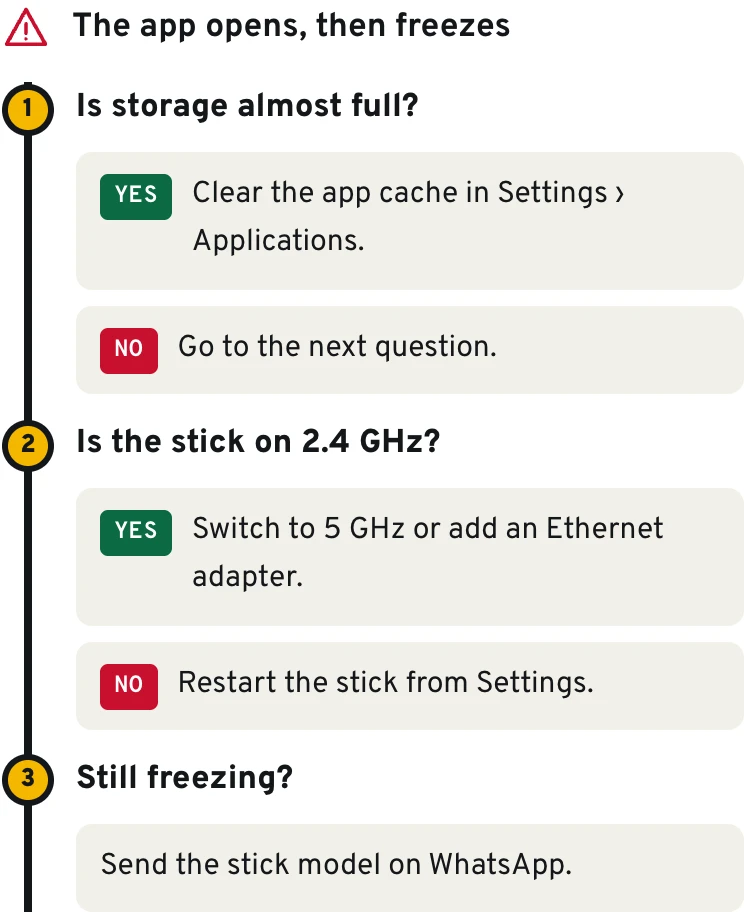
Freezes at 8 pm, fine at noon
Crowded 2.4 GHz Wi-Fi behind the TV
HDMI extender, the 5 GHz network, or the Ethernet adapter
Storage full warning
App caches filling an 8 GB stick
Settings, Applications, Manage Installed Applications, clear cache on unused apps
Guide shows the wrong hours
Player set to another time zone
Correct the EPG offset, usually filed under the player's EPG settings, until an 8 pm show sits at 8 pm
Login rejected
A typo or a space copied from the email
Retype username and password; both are case-sensitive
One TV 4K looks like HD
HD stick, or the TV's non-4K input
Use a 4K stick in the 4K HDMI port; some channels broadcast in HD only
Diagram
Find the fix in three questions
Mile6.6
From the support side
Why households keep the same Firestick IPTV service
Fire TV setups follow a clear pattern. People rarely leave over 40,000 channels versus 60,000. They leave when a guide is empty on a Friday night, when nobody replies, or when an app update wipes the login and they start over alone. Getting those three right is what separates a Firestick IPTV service that owners keep from the rest.
That is why our guide data is tied to the login itself, why WhatsApp gets a human reply on Saturdays and Sundays too, and why typing the login back in restores everything right away. A new stick simply takes over from the old one. Two sticks running together? Read our options for more than one TV.
Mile7.3
Eight checks before any Firestick purchase
Use it on us, or on anyone selling an IPTV service for Firestick owners. A straight answer to each line tells you more than any banner.
0/8 checked
Mile8.0
Firestick questions we hear on WhatsApp
Which plan suits a 4K stick?
One TV 4K for $69 a year, provided the stick feeds a 4K set. That stick then shows Ultra HD wherever the source carries it, pulls 60,000 international channels into its guide, and lets you go back up to 72 hours on replay-enabled channels.
Which plan is right for a Firestick Lite?
That would be One TV HD for $39 yearly. Full HD is the ceiling of a Lite anyway, and the plan brings 40,000 international channels plus 90,000 films and episodes with a complete guide. Pair it with a light player such as IPTV Smarters Pro or IBO Player.
Can one login run on two Firesticks?
Yes, with the right version. A plain One TV HD or One TV 4K line serves one device at any moment, so two sticks playing together call for the two-screen edition ($59 a year on One TV HD, $119 a year on One TV 4K) or for Whole Home Lifetime, which stretches to 4 screens.
Does a Fire OS update break my setup?
Your IPTV service for Firestick lives on our servers, so an update cannot touch it. An update can occasionally switch Install unknown apps back to Off; if a player stops updating, check that switch first.
Will it work on a stick in an RV or a dorm?
Yes. Plug the stick into any TV, join the new Wi-Fi under Settings, Network, and the player picks up where it left off. Campground Wi-Fi is often thin, so One TV HD or a strong phone hotspot behaves better there than 4K.
A household IPTV service on Firestick rarely stops at one stick. Plenty of US homes mix a Firestick in the living room with a Google TV box upstairs and a phone on the commute. The same login works on all of them, one device at a time on the single-screen plans. The Android TV and Google TV guide covers that second set, and every plan and option sits side by side on the plans page.
Last exit before the plans
Ready to set up your Firestick?
That is the whole route to a working IPTV service on Firestick. Choose the plan that fits your stick, check out with a card or a phone wallet, and keep the remote within reach. A screen refuses to move? A photo on WhatsApp is all we need to get you past it.