IPTV service from IPTV Services Provider is one login that puts 40,000 to 80,000+ international channels, a TV guide and a deep movie and series library inside the player app on your Firestick, smart TV, Apple TV or phone. You pay $39 or $69 for a year, or $299 one time, and you can ask for your money back within 60 days.
Diagram
How the line reaches your TV
Mile1.0
What you are buying
What our IPTV service actually is
Strip away the jargon and an IPTV service is a TV subscription that travels over your home internet instead of a coax cable or a satellite feed. We run the servers, the channel lineup and the program guide; you get an account, called a line, that you type into a player app. The idea is older than streaming sticks: Internet Protocol television has carried TV over data networks for two decades.
The apps themselves are built by independent developers. We never make or sell them, and a few charge their own small fee, which stays between you and the developer. That split matters on a bad night: a frozen menu is usually the app or the stick, a channel that refuses to open is ours to fix. Our page on how a provider divides the work with the app goes deeper.
The household side is just as plain. No receiver to rent, no technician window between 8 and noon, no contract to cancel by phone. Move from a Queens walk-up to a rental in Fort Worth and the account comes along: plug the stick into the new TV, join the new Wi-Fi, and the guide is back where you left it.
Plans
Three IPTV service plans, matched to how your home watches
One TV HD for one TV and everyday viewing, One TV 4K for the big screen and a 3-day replay, Whole Home Lifetime for houses with several TVs that would rather pay once. Four in-between options cover a second or third screen and a pay-once One TV 4K.
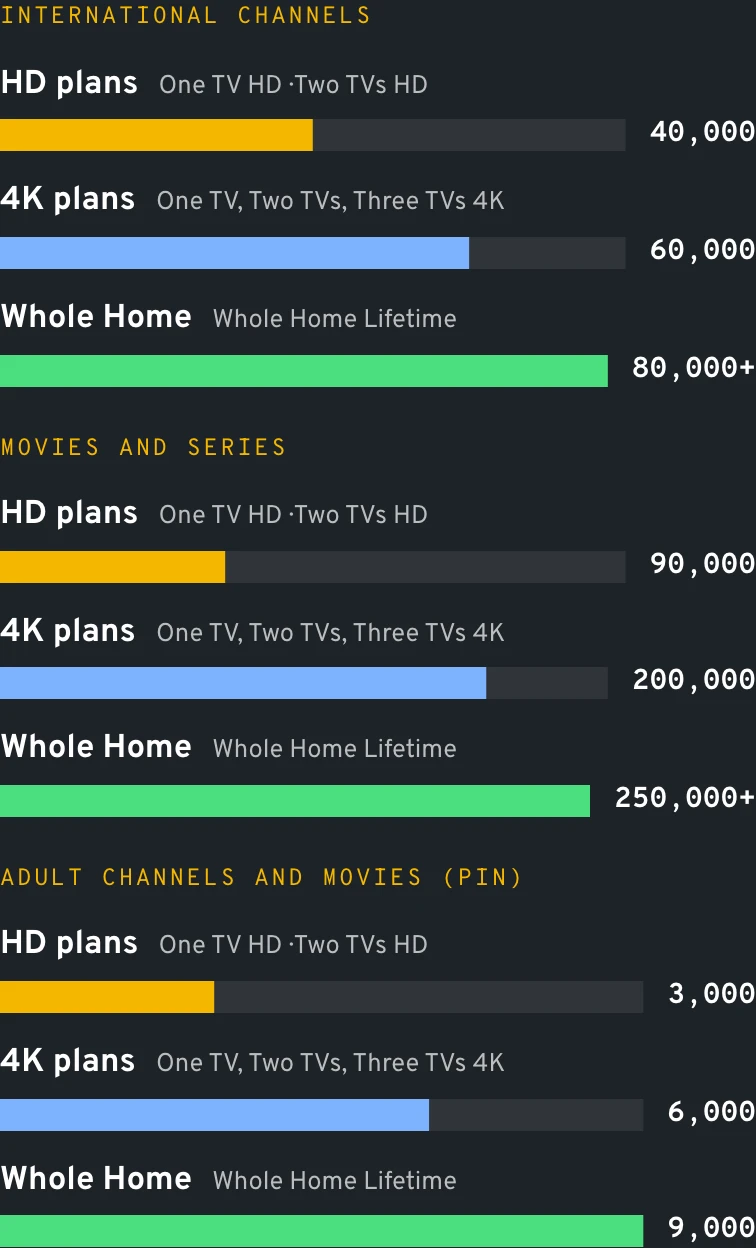
One TV HD lists 40,000 of them, One TV 4K 60,000, Whole Home more than 80,000. Each country gets its own folder, which is why Telugu news never ends up next to Polish football.
Movies and series
Movies and episodes by the shelf-load: One TV HD opens 90,000 titles, One TV 4K 200,000, Whole Home upward of 250,000, all browsable by poster, season and episode.
TV guide (EPG)
The now-and-next grid comes with every plan, and most player apps let you shift it by whole hours for Eastern, Central, Mountain or Pacific time.
Catch-up
One TV 4K keeps a 3-day replay on channels that carry it, Whole Home keeps 7 days, so a game that ended past midnight in New York is still there at breakfast.
Adult section behind a PIN
An 18+ area sized to your tier opens only with the personal PIN emailed alongside your account. Parents reuse that code to keep younger viewers out of anything else they choose.
VPN link
Every IPTV service plan ships with its own VPN link, which travelers switch on over hotel, dorm or campground Wi-Fi.
Data
What one login opens, by tier
Mile2.4
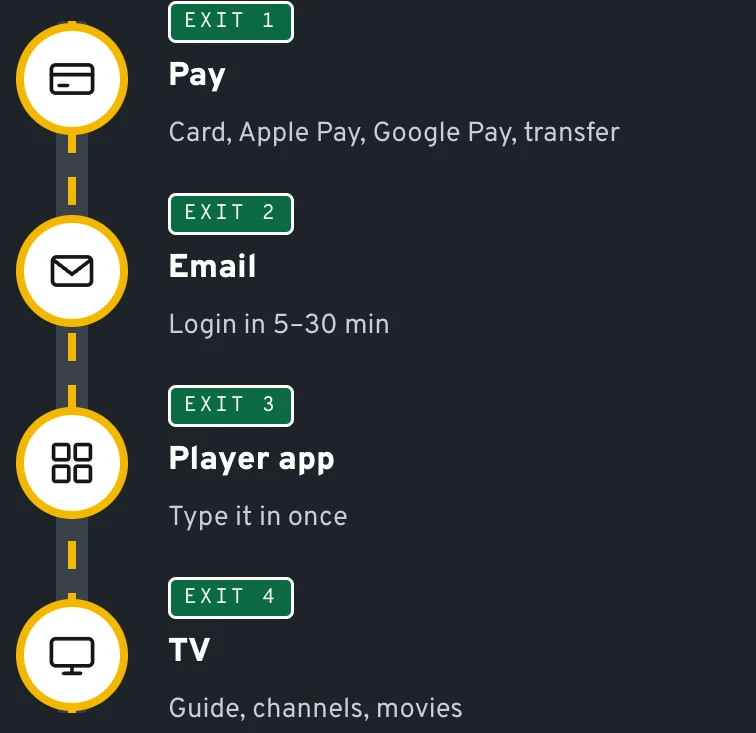
From checkout to the couch in four moves
Four steps sit between ordering the IPTV service and flipping through the first channel, and none of them involves a technician.
Pick the plan
Use the cards above, or send us a WhatsApp message with the plan name and the number of TVs in the house. Not sure? List your devices and we will point you at the right tier.
Pay the way you prefer
Cards from the major networks, Apple Pay and Google Pay all clear at the secure checkout. Paying from your bank instead trims 10%: $35.10, $62.10 or $269.10 for the three main plans.
Open your inbox
An email follows with your Xtream codes (server address, username, password) or an M3U link; the wait is typically five to thirty minutes. Office and school spam filters occasionally hide that message.
Type it into a player app
Open the app on your stick, TV or phone, choose the Xtream codes option (labels vary by app version) and fill in the three fields. Channels, guide and library load within a minute or two.
The IPTV service behaves the same on every screen, but each device has its own small quirks. Our step-by-step pages cover the Fire TV install route, Samsung and LG smart TVs and MAG boxes that use a portal URL.
Illustration
What the login email contains
Inbox
Your IPTV login
From: IPTV Services Provider · 5–30 min after payment
Server URL
http://line.••••••.net:8080
Username
us-••••••
Password
••••••••••
M3U link
…/get.php?username=us-••••••
Guide (EPG)
…/xmltv.php
Adult PIN
••••
Reply on WhatsApp if anything looks off.
Illustration with masked details.
Mile3.1
Where it plays
Your screens, not ours
Our IPTV service comes without hardware, and most homes need none. A Fire TV Stick or a Chromecast with Google TV behind the set covers the majority of households we help; Samsung and LG owners use apps from their TV store; Apple TV 4K and iPhone owners pick a player from the App Store. Roku is the odd one out: no common IPTV player runs on it, so a small Fire TV or Google TV stick on a spare HDMI port solves it.
Budget about 15 Mbps per 4K stream; Full HD needs a fraction of that. Put the stick on the 5 GHz network or a wired adapter, because in a dense apartment building thirty routers fight over the 2.4 GHz channels every evening.
Mile3.8
Devices that pair well with one login
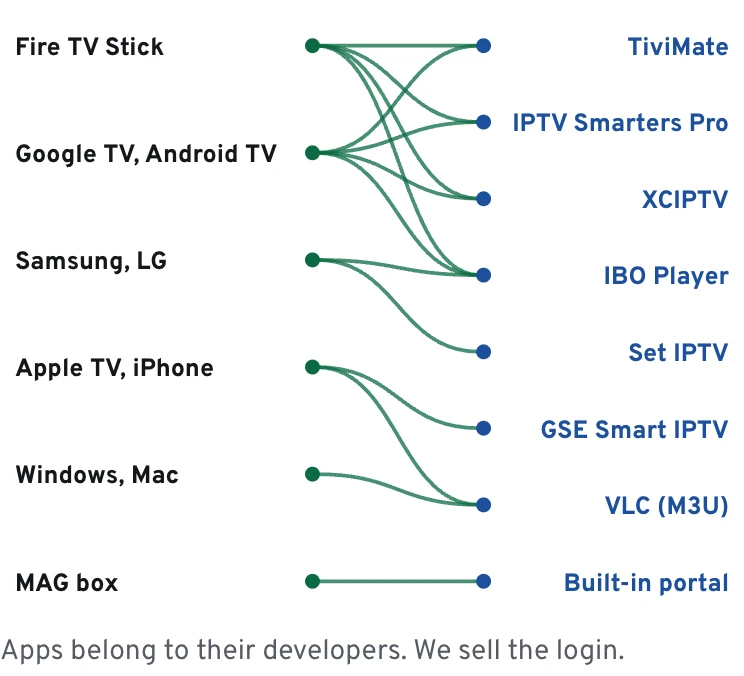
Every plan works in every common player app. Here is how the usual American setups behave.
Fire TV Stick and Fire TV
The most common pairing in US homes. The 4K sticks carry One TV 4K comfortably; the Lite is fine for One TV HD on a bedroom TV.
Samsung and LG smart TVs
Look in the set's own store for IBO Player or Set IPTV; Samsung runs Tizen, LG runs webOS. Some of these players bill a small activation fee, and that money goes to the app maker.
Google TV and Android boxes
Chromecast with Google TV, Shield-class boxes and TCL, Hisense or Sony Google TV sets run TiviMate and XCIPTV smoothly with big lists.
iPhone, iPad and Android phones
Bleacher seats at a Saturday practice, a lunch break, the ride home: the same account plays in a mobile player app.
Windows and Mac
Any desktop player, VLC included, opens the M3U link: handy in a dorm room or on a work trip.
MAG boxes
Its MAC address, printed on the sticker underneath, goes to us on WhatsApp; a portal URL for the box menu comes back.
Diagram
Which player app runs where
Mile4.5
Languages American households ask us for
The international channels in the IPTV service are filed by country, so each family can live inside the language folders it actually watches.
Spanish
Programming from Mexico, Puerto Rico, Cuba, the Dominican Republic and the rest of Latin America, from talk shows to weekend soccer.
South Asian
For Desi households: news and serials in Hindi, Punjabi, Urdu, Tamil, Telugu or Gujarati, and cricket at hours that suit Mumbai better than Houston.
East and Southeast Asian
Tagalog news for Filipino homes, plus Korean dramas, Vietnamese variety shows and Chinese-language bulletins for dinner-table viewing.
Arabic and African
Arabic-language channels and programming for Nigerian, Ghanaian and Ethiopian communities.
Caribbean and Lusophone
Haitian, Caribbean, Brazilian and Portuguese channels, music shows and soccer.
European
Polish, Russian, Ukrainian, Italian and Greek channels for grandparents who never warmed to English-language TV.
Mile5.2
Time zones
One schedule, four clocks
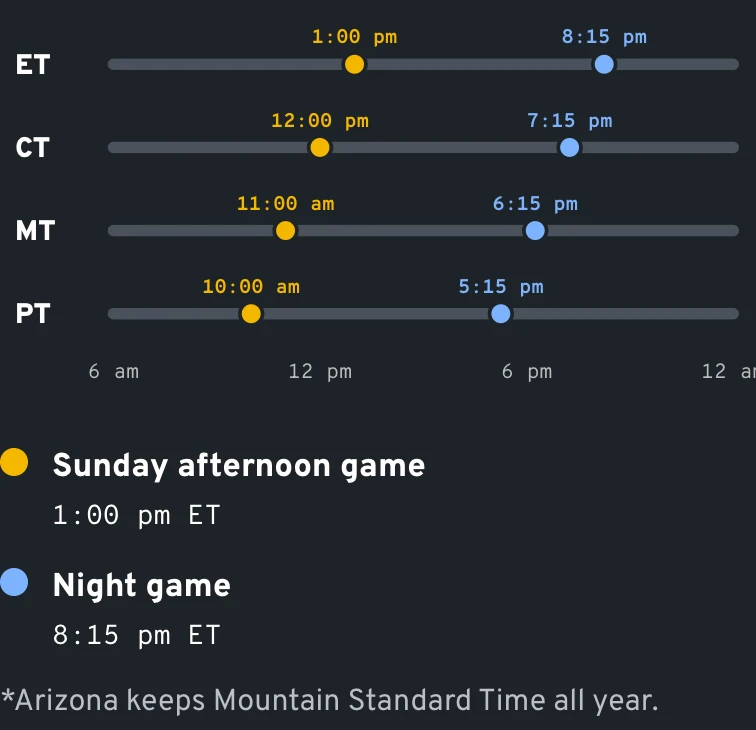
The IPTV service guide data runs on a single clock and your player app shifts it to yours. Get the offset right once and the grid lines up with the wall clock. Take the early Sunday football window as the example.
ET
1:00 pm
Boston, Philadelphia and Washington DC: lunch plates are still on the coffee table when the early slate begins.
CT
12:00 pm
Chicago and the Gulf Coast get it at noon sharp, usually straight after the grocery run or a late brunch.
MT
11:00 am
Denver watches over a second coffee. Arizona skips daylight saving, so until early November its guide shows 10:00 am, Pacific-style.
PT
10:00 am
Los Angeles, San Diego and Seattle wake up to the opening drive, and the late-afternoon games follow right after lunch.
Data
One start time, four clocks
Mile5.9
Season board
A year of American sports on one login
Sunday
Pro football
Early games at 1 pm ET, which is 10 am on the West Coast
Set the guide offset before September
Saturday
College football
Slates from noon to past midnight through bowl season
One TV 4K catch-up saves the late kickoff
Weeknights
NBA and NHL
October to June, often two time zones apart
A second screen helps on crowded nights
Weekend mornings
European soccer
Kickoffs as early as 7:30 am ET, 4:30 am PT
Catch the replay over breakfast on any 4K line or Whole Home
Saturday night
MMA and boxing
Headline bouts that often go on after 11 pm Eastern
A wired connection keeps 4K steady through the main event
Mile6.6
Who it fits
Which plan suits which American home
The renter who moves every lease
One TV HD at $39 a year on one Firestick. Nothing to return when the lease ends, nothing to reschedule, and the IPTV service crosses state lines with you.
The sports family with one big TV
The 65-inch set finally earns its keep. Ultra HD on One TV 4K is $69 for the whole season and beyond, and replay reaches back far enough for overtime that ran past bedtime.
The three-generation house
Whole Home Lifetime, $299 paid once, lets four TVs play together: grandparents keep Spanish-language news going upstairs while the teenagers stream a movie in the basement.
Snowbirds and RV travelers
One TV 4K on a tablet and a stick, with the VPN link on over campground Wi-Fi, from the Florida Keys in January to a Montana lake in July.
Sports fans usually want two answers: which leagues show up in the lineup and how replay handles late games. The US sports viewing guide covers both. For a channel-by-channel view of languages, movies and series, see what 40,000 to 80,000 channels really means, and for the wider picture of how this works state by state, IPTV across the US.
No company names here, only the line items people tell us they were paying before they switched.
Typical cable or satellite package
IPTV Services Provider
Equipment
A rented receiver for each TV
Your own stick, TV app or phone
Getting started
Installer appointment
Account details by email
Commitment
Often a 1- or 2-year agreement
One year at a time, or one payment
Regional sports fee
Common line item
None
Moving to a new address
Transfer or cancel the account
Same login, new Wi-Fi
Languages beyond English and Spanish
Paid add-on packs
Grouped by country inside the lineup
Refund window
Depends on the contract
60 days, on request
Data
Five years of TV, three ways to pay
One TV 4K$345 after 5 years$69 a year
Two TVs 4K$595 after 5 years$119 a year
Whole Home Lifetime$299 in totalpaid once
Whole Home Lifetime beats One TV 4K in year 5.
Whole Home Lifetime beats Two TVs 4K in year 3.
Real prices, simple sums. No renewal on lifetime plans.
Mile8.7
Paying and refunds
Payment, renewal reminders and the 60-day refund
The IPTV service checkout accepts the major card networks along with both phone wallets, Apple Pay and Google Pay; send the money straight from your bank and the price drops by 10%. Your statement shows a neutral label, nothing that spells out TV. Our payment page lists every transfer amount and how the secure link reaches you on WhatsApp.
A yearly plan does not quietly vanish on its anniversary. Before it expires we send a WhatsApp reminder, so you choose whether to renew, switch tier or move to a lifetime line while there is still time.
Not happy with the IPTV service? Write to us on WhatsApp or by email before the 60th day after purchase and ask for a refund; the refund policy walks through each step after that.
Data
The 60-day refund window
60days from purchase
2ways to ask: WhatsApp or email
Mile9.4
Mile10.1
Have these ready before you order
Five minutes of prep before you order the IPTV service saves a support message later.
0/7 checked
Mile10.8
Questions we hear every week
What is IPTV, in one sentence?
It is TV delivered over your internet connection into a player app, using a login from a provider like us instead of a cable box and a coax line.
How much does it cost?
One TV HD is $39 for twelve months and One TV 4K is $69; Whole Home Lifetime costs $299 once. Four more options sit in between, for extra screens or a single-payment One TV 4K, and all seven sit side by side on the plans page.
Which devices can I use?
Fire TV sticks, Google TV and Android TV devices, Samsung and LG smart TVs, Apple TV, iPhone, iPad, Android phones, Windows, Mac and MAG boxes. Roku does not run the usual player apps, so add a small stick to that TV.
How many TVs can watch at the same time?
Count the TVs that will be on at the same moment. One plays on One TV HD or One TV 4K, two on either two-screen option ($59 or $119), three on the $249 one-time line and four on Whole Home Lifetime. See the multi-screen guide for how families divide them.
Will I get my league's games?
Sports take up a big slice of the lineup: pro and college football, the NBA, MLB, NHL, MLS and soccer from Europe and Latin America. Which games appear depends on what the international channels broadcast that week, so we never promise one particular match or channel.
What does lifetime mean on Whole Home?
Whole Home Lifetime is a $299 purchase with no renewal date attached. Your line stays on while we run the service, and the lifetime cost breakdown sets out the break-even numbers against yearly One TV 4K.
Is there an adult section, and can I lock it?
Yes, and it stays locked until you open it. The 18+ catalog grows with the tier (3,000 adult channels and movies at the entry level, 6,000 with One TV 4K, 9,000 with Whole Home) and sits behind a personal PIN that we email along with your account. Swap it for a code of your own, or reset it, from the parental settings in the app.
Is the app or the Firestick included?
Neither. What you buy is the line, the account the app reads. TiviMate, IBO Player, IPTV Smarters Pro and the rest are published by their own developers, and the hardware stays whatever already sits by your TV.
Does it work in Alaska and Hawaii?
Yes. The IPTV service runs over any home internet connection, and the guide offset in most player apps covers Alaska and Hawaii time as well as the four mainland zones.
How do I reach a real person?
Message +1 307 400 8970 on WhatsApp any day of the week, or write to [email protected]. We send company details when you ask for them, and our longer FAQ covers setup and account questions.
Send the number of screens, the devices you use and the sports or languages you care about. A support lead replies on WhatsApp with the IPTV service plan that fits, and your account can be on its way minutes later.