For a US household, the best IPTV service is the one that scores well on seven things you actually feel at home: how fast the login lands, who answers on a Sunday night, whether the refund is written down, picture quality, the TV guide, catch-up and the player apps it runs in. Below is the scorecard our support leads use, with our own answers filled in so you can hold us to every line.
In numbers
The scorecard answers, in numbers
5–30min
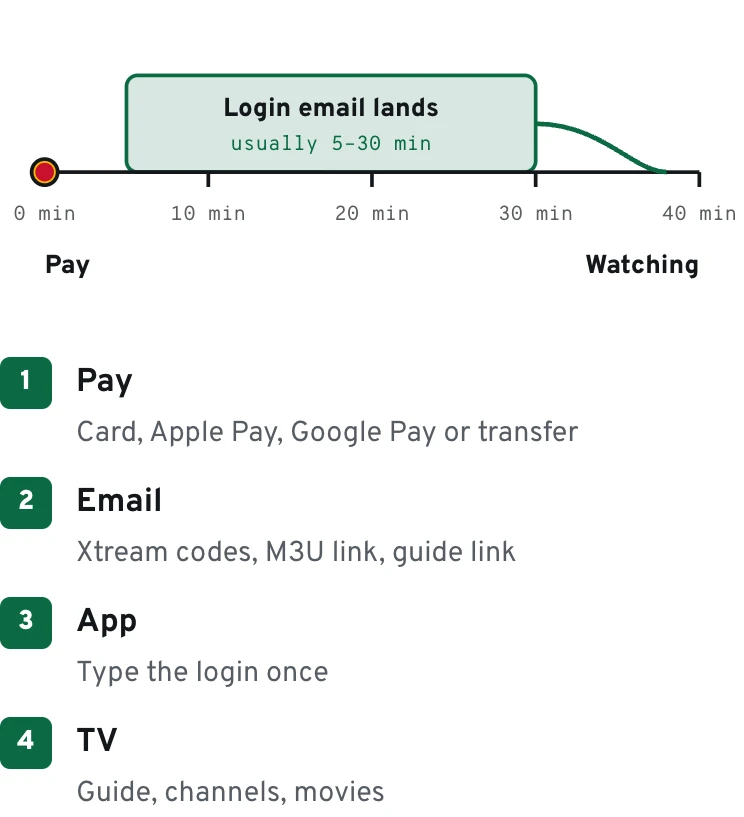
typical login delivery by email
60days
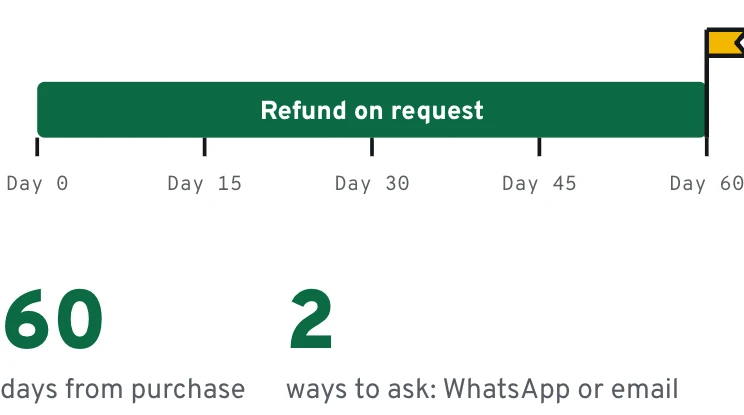
to ask for a refund
4K
Ultra HD on the 4K plans and Whole Home
7days
a week on WhatsApp
Mile1.0
Start here
What makes the best IPTV service for a US home
Channel counts are the number every IPTV streaming service shouts about, and they tell you the least. Nobody scrolls through forty thousand entries. What you notice is smaller and more personal: the login that shows up before kickoff, a guide that lines up with Central time, a real person replying on a Sunday evening when the den TV says the account can't connect.
That is also why we don't publish a ranking of sellers. A list goes stale the week it is written; a scorecard keeps working, on us and on anyone else you are weighing. Use it, keep the notes, and pick the best IPTV service for your own address rather than for someone else's headline.
So we score the best IPTV service the way a family lives with it across a whole year: buying, setting up, watching on a crowded night, renewing. Seven lines carry most of the weight. The checklist turns them into questions you can send to any seller before money moves, and the table after it shows the answer we publish on each one.
Plans
Three plans built to pass the scorecard
Paid yearly or once, never a rolling bill. Each plan ships with a program guide, VPN access and a PIN lock, sits under the 60-day refund, and works inside the player you already use.
Send these questions before you pay. A serious seller answers each one in a single message, without changing the subject.
0/12 checked
Mile2.4
Each scorecard line, with our answer next to it
Left: what a strong answer sounds like. Middle: the reply that should make you pause. Right: what we publish for our own plans.
Strong answer
Pause if you hear
Our answer
Delivery
A time window in writing
“Within 24 to 48 hours”
Email, usually 5–30 min
Support
Sales and help on one channel
Help only by ticket form
WhatsApp, 7 days a week
Refund
Days and method stated
“Digital goods are final”
60 days, WhatsApp or email
Picture
4K tied to specific plans
4K promised with no speed advice
The 4K plans and Whole Home; about 15 Mbps
TV guide
EPG loads inside your app
“Guide coming soon”
EPG on every plan
Catch-up
Replay days per plan
Vague “replay available”
3 days One TV 4K, 7 days Whole Home
Apps
Works in common player apps
Only their own branded app
Any common player app
Price
Listed on the site
Price only in private chat
$39 or $69 a year, $299 once
Screens
Count stated per plan
“Share it with the family”
1 screen; options up to 3; Whole Home 4
Data
Scorecard line: delivery speed
Mile3.1
Common traps
Three scores that look good on paper
A support line you can't reach on a Sunday scores zero, whatever the banner says.
A huge channel total with an empty guide. If half the list shows “no information” in the grid, you will spend evenings guessing. Ask what share of the list carries EPG data before you weigh the headline number.
4K on every plan, no questions asked. A seller that never mentions bandwidth has not set up many living rooms. The best IPTV service tells you which plan carries Ultra HD and what your connection needs for it.
Support that is really a form. A contact page that promises a reply in two business days is a sales funnel, not help. Score the channel you can reach at 9 pm Eastern on a Saturday, because that is when the questions arrive.
Mile3.8
Data
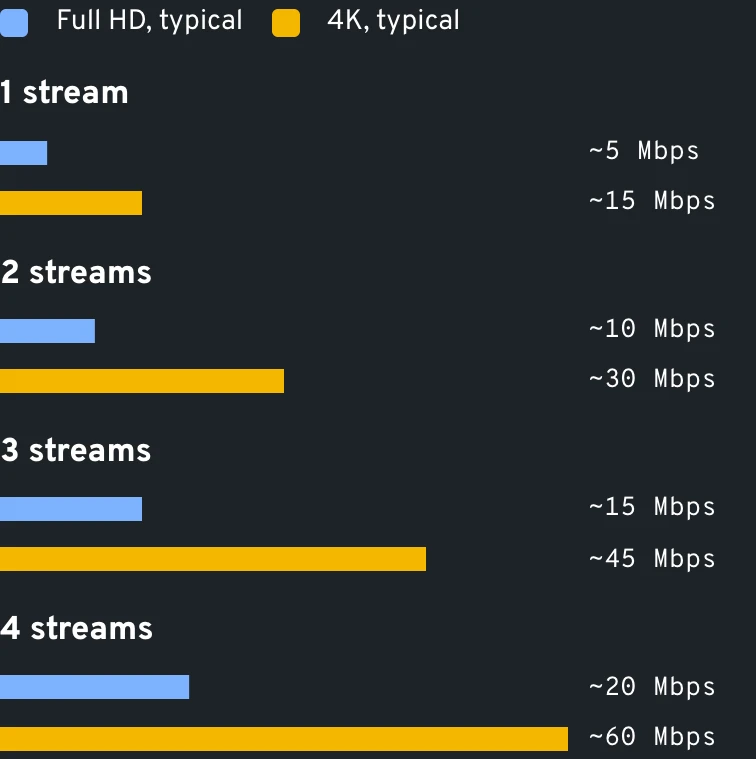
Typical speed to budget per stream
Mile4.5
At home
Fill in the scorecard during your first weekend
Friday, checkout
Checkout with Apple Pay, Google Pay or a major card takes a minute; a bank transfer knocks 10% off but clears more slowly. Note the clock when you pay. When the email carrying your Xtream codes lands, you have your first mark.
Friday night, setup
Type the login into TiviMate, IPTV Smarters Pro or the app you already use, then load the guide. If Denver shows Eastern times, change the EPG offset in the app settings; menu names vary by app version.
Saturday, college football
Open the sports category on a busy afternoon and hop between three games. A couple of seconds to start each stream is normal; long stalls on a wired TV are worth a message.
Sunday evening, support
Ask one real question on WhatsApp at the hour you would normally watch. How long the reply takes is your support score, and it is the line that matters most in month six.
Day 30, the verdict
Thirty days in, every line on the card has a mark. Your refund window still has thirty days to run, so you decide with full information.
Mile5.2
Picture
Score picture quality against your own connection
A 4K stream needs about 15 Mbps to itself, so a household running two laptops on video calls and a game console download will feel it before the provider does. Run a speed check on the TV itself, not on your phone in the kitchen.
Ethernet beats 5 GHz Wi-Fi, and 5 GHz beats 2.4 GHz through two walls. Full HD on One TV HD needs a fraction of the bandwidth, which is why it suits a bedroom TV at the far end of the house. If your line is fine and the picture still drops, that is a provider problem, and it belongs on your scorecard for the best IPTV service.
Try it
Score the picture yourself
Full HD
4K
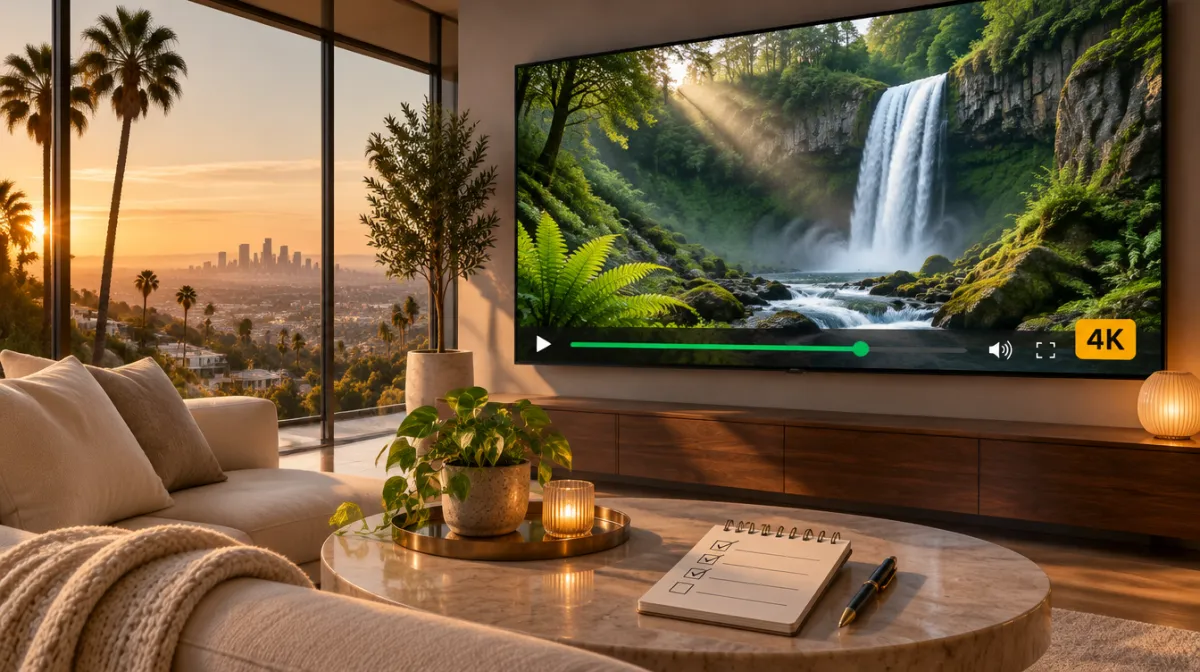
Illustration of the extra detail, not a broadcast.
Mile5.9
Weighting
How we weight the seven lines
Support: heaviest
Every other line eventually becomes a support question. Score the reply, not the promise.
Delivery: heavy
An IPTV streaming service that needs two days to send a login will need two days to fix a problem.
Refund: heavy
Sixty days written on the site means you can judge a full sports month before deciding.
Picture: medium
4K matters on a 65-inch living-room set, much less on a bedroom TV or a phone.
Guide and catch-up: medium
A clean EPG and three to seven days of replay change how a household watches.
Apps: medium
Your login should work in the app you already know, from its own developer.
Mile6.6
How the top IPTV services compare with cable and live-TV apps
Generic models, no brand names. Read across a row to see what changes for your household.
IPTV streaming service
Live-TV streaming app
Cable or satellite
How you pay
Yearly or one-time
Recurring subscription
Recurring bill plus fees
Equipment
A stick or smart TV you own
A stick or smart TV you own
Rented box per TV
Installation
Type a login into an app
Sign in to the app
Installer appointment
Channel range
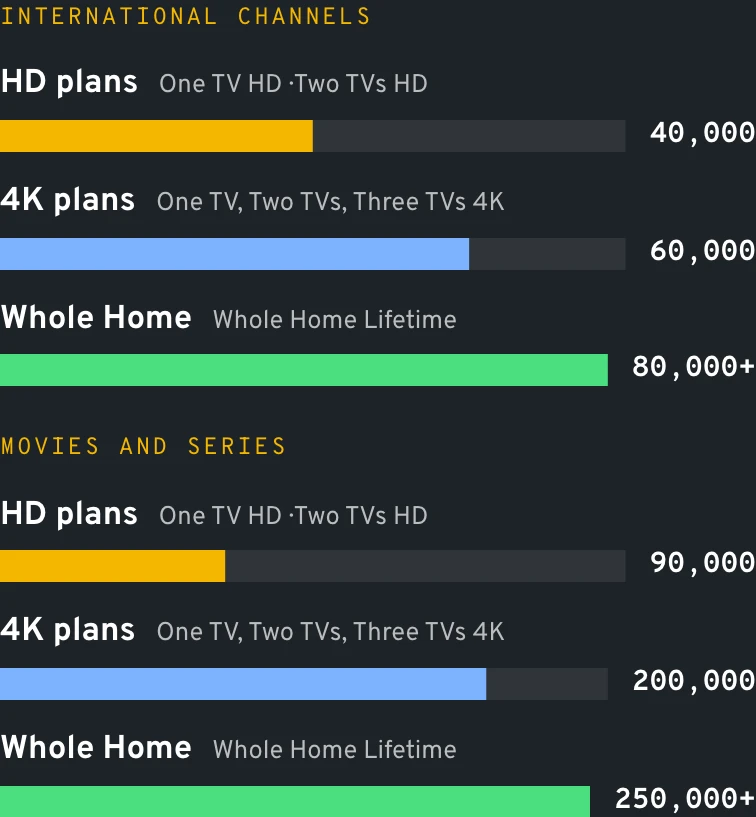
40,000 to 80,000+ international
Mostly national networks
National plus local tier
Languages
Dozens, from Spanish to Tagalog
Few, often as add-ons
Few, often as add-ons
Movies and series
90,000 to 250,000+ titles
Varies by app
On-demand menu, some rentals
Replay
3–7 days on the 4K plans and Whole Home
Cloud recording
DVR box
Moving apartments
Login moves with you
App moves with you
New install at the new address
Sports from abroad
Wide, across many countries
Limited
Limited
Data
Scorecard line: the refund
Mile7.3
Features the strongest IPTV streaming services share
Strip away the banners and the top IPTV services look alike in six ways. Use them as a filter.
A working guide
An EPG that fills the grid, adjustable for ET, CT, MT or PT, so tonight's schedule reads correctly in Phoenix and in Boston.
Replay with a number
Catch-up measured in days per plan, so the West Coast fan can still see a 7 pm Eastern game after work.
Real language depth
Full channel groups for the languages your family speaks, not a single token channel per country.
App freedom
The login works in the player you already like, made by its own developer, on every screen you own.
A PIN that means it
Parental controls, plus an adult section that stays hidden until someone types the personal PIN; adults in the house can reset it whenever they like.
Plain pricing
Prices you can read before talking to anyone, a refund counted in days, and a nudge before the end date.
Data
Scorecard line: the catalog
Mile8.0
Our plans
Which plan scores highest in your house
One TV HD, $39 a year, fits a single Full HD set: 40,000 international channels, 90,000 on-demand titles, the guide and your PIN. Step up to One TV 4K, $69 a year, when the main TV is a 4K panel: Ultra HD, a 60,000-channel list, 200,000 titles, and a three-day replay window for the game that ran past bedtime.
For a busy house there is Whole Home Lifetime, one payment of $299. Four TVs can watch together, the line runs on a dedicated server, replay reaches back a week, the list passes 80,000 channels, and members join our private Premium Telegram group. Adult catalogs step up per tier (3,000, then 6,000, then 9,000 titles) and stay behind your own PIN. The complete plan list with screen options shows all seven offers.
Two TVs on different floors change the math. Two TVs HD is $59 a year and Two TVs 4K is $119 a year. If you would rather pay once, One TV 4K Lifetime covers one device for $129, and the three-screen lifetime option is $249. Each one keeps the same guide, PIN and refund window as the main plans.
We would rather lose a sale to an honest scorecard than keep a customer who never got a reply. That is why our answers sit in the table above, where you can quote them back.
The IPTV Services Provider support team
Mile9.4
Questions buyers ask about top IPTV services
Which plan suits a typical US household?
The best IPTV service for most homes with one main 4K TV is a plan that delivers fast, answers on weekends and refunds without a fight. In our lineup that is One TV 4K at $69 a year; a home with three or four TVs scores higher with Whole Home Lifetime.
Does the biggest channel number win?
No. Past a few thousand entries, channel totals stop changing what you watch. Delivery, support, a working guide and catch-up change your evenings far more, which is why they lead our scorecard.
Which plan works best for football and other sports?
They should, and the window belongs on the site in plain words. Ours runs 60 days from checkout; one message to support starts it, and the refund page walks through what happens next.
Will the best IPTV services run on a Firestick?
Yes. The login goes into a player app built by an outside developer, TiviMate and IPTV Smarters Pro being the usual pair on Fire TV. Our Fire TV setup walkthrough covers installation and which models handle 4K.
How fast should the login arrive?
Inside the hour, with the window printed on the site rather than promised in chat. Ours normally reaches your inbox between five and thirty minutes after checkout: Xtream codes for most apps, plus a playlist link for the few that want one.
Can I pay by bank transfer?
We accept it and take 10% off: One TV 4K becomes $62.10, One TV HD $35.10 and Whole Home Lifetime $269.10. Cards, Apple Pay and Google Pay settle faster if you want to watch tonight.
What exactly is IPTV?
It is TV carried over the same broadband line that feeds your laptop, rather than over coaxial cable or a rooftop satellite. For the engineering side, this Wikipedia article is a solid read.